

CELEST5566 Gamer Watch
Personalization
0.0
718 Download
"Pixel art gamer watch face with a gyroscope-steered ship & 343 combinations."
Installa su Google Play
App a pagamento



Info su questa app
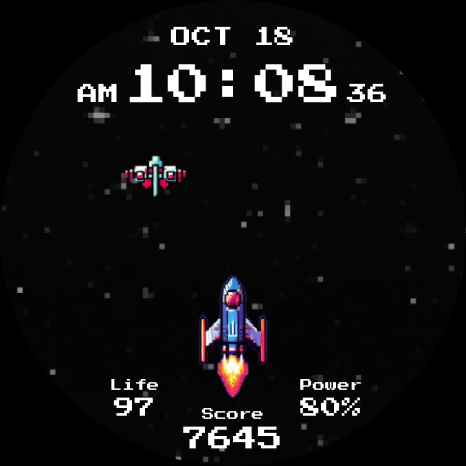
Digital, and pixel-drawn: CELEST5566 Gamer Watch turns your wrist into a scrolling arcade shooter — a starfield running endlessly beneath a pixel-art spaceship, with power-ups drifting past on their way down the screen. For Wear OS 5+ devices, including Galaxy Watch and Pixel Watch.
The ship reacts to your wrist. Tilt and it banks, thanks to the watch's gyroscope, which makes the dial feel alive in a way a static image never does. Your stats are recast as game readouts: heart rate becomes Life, step count becomes Score, and battery becomes Power. The date and time sit across the top in an 8-bit font. It isn't a playable game, but it behaves like one, and that's the appeal.
🎮 Features
- Endlessly scrolling pixel-art starfield
- Spaceship that banks with your wrist via the gyroscope
- Drifting power-ups crossing the screen
- Heart rate as Life, steps as Score, battery as Power
- Date and time in an 8-bit pixel font
- Five optional circular complications
🎨 Customization
- 7 background variations
- 7 spaceship designs
- 7 power-up styles, for 343 combinations in total
- Option to strip back most of the always-on view for a minimal look
- Five optional circular complications for weather, calendar, or your next appointment
✅ Compatible Devices
- Google Pixel Watch/2/3/4/5
- OnePlus Watch 2/2R/3/4
- Oppo Watch X2/X3
- Samsung Galaxy Watch 4/4 Classic/5/5 Pro/6/6 Classic/7/8/8 Classic/9/FE/Ultra (2024)/(2025)/Ultra 2
- Xiaomi Watch 2/2 Pro/5
🎁 BOGO Promotion: https://celest-watches.com/bogo/
✨ Explore the complete CELEST collection in one place — including all Wear OS, HUAWEI, and Apple Watch faces, along with our apps and tools — with the CELEST Catalog app: https://play.google.com/store/apps/details?id=com.celestwatches.catalog
🔧 Installation Help
Having trouble? We've got you covered:
- Use the dropdown menu next to "Install" on your phone to select your watch model or install directly from your watch's Play Store app.
- Updating weather data (if the watch face shows weather) may take time after installation but switching to another watch face and switching back or restarting both the watch and phone usually helps.
- Check out our installation and troubleshooting guide: https://celest-watches.com/installation-troubleshooting/
- Contact us at [email protected] for quick support
📞 Support & Community
📧 Support: [email protected]
📱 Follow @celestwatches on Instagram and subscribe to our newsletter to get notified of new releases and deals: https://celest-watches.com/newsletter/
The ship reacts to your wrist. Tilt and it banks, thanks to the watch's gyroscope, which makes the dial feel alive in a way a static image never does. Your stats are recast as game readouts: heart rate becomes Life, step count becomes Score, and battery becomes Power. The date and time sit across the top in an 8-bit font. It isn't a playable game, but it behaves like one, and that's the appeal.
🎮 Features
- Endlessly scrolling pixel-art starfield
- Spaceship that banks with your wrist via the gyroscope
- Drifting power-ups crossing the screen
- Heart rate as Life, steps as Score, battery as Power
- Date and time in an 8-bit pixel font
- Five optional circular complications
🎨 Customization
- 7 background variations
- 7 spaceship designs
- 7 power-up styles, for 343 combinations in total
- Option to strip back most of the always-on view for a minimal look
- Five optional circular complications for weather, calendar, or your next appointment
✅ Compatible Devices
- Google Pixel Watch/2/3/4/5
- OnePlus Watch 2/2R/3/4
- Oppo Watch X2/X3
- Samsung Galaxy Watch 4/4 Classic/5/5 Pro/6/6 Classic/7/8/8 Classic/9/FE/Ultra (2024)/(2025)/Ultra 2
- Xiaomi Watch 2/2 Pro/5
🎁 BOGO Promotion: https://celest-watches.com/bogo/
✨ Explore the complete CELEST collection in one place — including all Wear OS, HUAWEI, and Apple Watch faces, along with our apps and tools — with the CELEST Catalog app: https://play.google.com/store/apps/details?id=com.celestwatches.catalog
🔧 Installation Help
Having trouble? We've got you covered:
- Use the dropdown menu next to "Install" on your phone to select your watch model or install directly from your watch's Play Store app.
- Updating weather data (if the watch face shows weather) may take time after installation but switching to another watch face and switching back or restarting both the watch and phone usually helps.
- Check out our installation and troubleshooting guide: https://celest-watches.com/installation-troubleshooting/
- Contact us at [email protected] for quick support
📞 Support & Community
📧 Support: [email protected]
📱 Follow @celestwatches on Instagram and subscribe to our newsletter to get notified of new releases and deals: https://celest-watches.com/newsletter/
Info App
Versione
Aggiornato il
Aug 05, 2026
Dimensione
Richiede Android
ID pacchetto
com.watchfacestudio.celest5566
Installazioni
718
Categoria
Personalization
Novità
Updated to target Android 16 (API 36).
Autorizzazioni app
-
Other
- view network connections
- full network access


