CELEST5667 Minimalist Watch
Personalization
0.0
8 Download
"Pixel digital watch face with fixed readouts, no complications & 30 colors."
Installa su Google Play
App a pagamento


Info su questa app
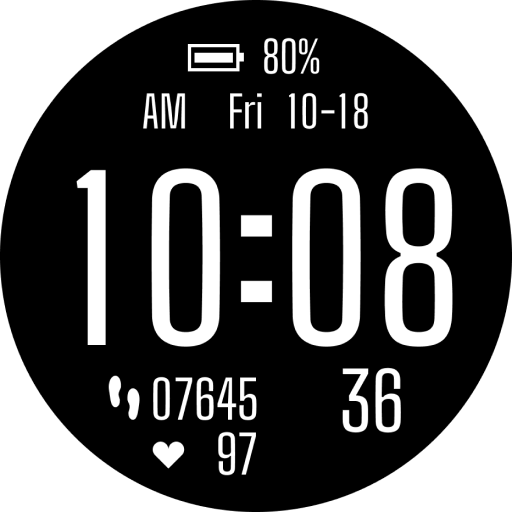
Digital, pared to five lines: CELEST5667 Minimalist Watch shows heart rate, time, date, temperature and steps in one column of chunky pixel type. Every readout is fixed and drawn from the watch itself, so there are no configurable complication slots on this watch face — nothing to assign, nothing to set up.
The dial is black and the hierarchy does the work. Heart rate sits at the top in an accent color beside a small pixel heart, the time follows in the largest type on the face, then the date, the temperature and the step count in progressively quieter tones. A small caps label runs down the right edge of each line, so you can read the whole stack in one glance without hunting for context. CELEST5667 Minimalist Watch keeps the layout identical across every color option — the only thing that changes is the ink.
🎮 Features
- Five fixed readouts in a single column: heart rate, time, date, temperature and steps
- Chunky pixel numerals sized for reading at a glance
- Small caps labels identifying every line
- No configurable complications and no setup screens to work through
🎨 Customization
- 30 color variations across the full stack
- Accent schemes that color the heart rate line alone, leaving the rest in white and gray
- Full-stack palettes in cool blues, muted mauves, olive, amber and ice blue
- Subtle background tints as an alternative to pure black
✅ Compatible Devices
- Google Pixel Watch/2/3/4
- OnePlus Watch 2/2R/3
- Oppo Watch X/X2
- Samsung Galaxy Watch 4/4 Classic/5/5 Pro/6/6 Classic/7/8/8 Classic/9/FE/Ultra (2024/2025)/Ultra2
- Xiaomi Watch 2/2 Pro/5
🎁 BOGO Promotion: https://celest-watches.com/bogo/
✨ Explore the complete CELEST collection in one place — including all Wear OS, HUAWEI, and Apple Watch faces, along with our apps and tools — with the CELEST Catalog app: https://play.google.com/store/apps/details?id=com.celestwatches.catalog
🔧 Installation Help
Having trouble? We've got you covered:
- Use the dropdown menu next to "Install" on your phone to select your watch model or install directly from your watch's Play Store app.
- Updating weather data (if the watch face shows weather) may take time after installation but switching to another watch face and switching back or restarting both the watch and phone usually helps.
- Check out our installation and troubleshooting guide: https://celest-watches.com/installation-troubleshooting/
- Contact us at [email protected] for quick support
📞 Support & Community
📧 Support: [email protected]
📱 Follow @celestwatches on Instagram and subscribe to our newsletter to get notified of new releases and deals: https://celest-watches.com/newsletter/
The dial is black and the hierarchy does the work. Heart rate sits at the top in an accent color beside a small pixel heart, the time follows in the largest type on the face, then the date, the temperature and the step count in progressively quieter tones. A small caps label runs down the right edge of each line, so you can read the whole stack in one glance without hunting for context. CELEST5667 Minimalist Watch keeps the layout identical across every color option — the only thing that changes is the ink.
🎮 Features
- Five fixed readouts in a single column: heart rate, time, date, temperature and steps
- Chunky pixel numerals sized for reading at a glance
- Small caps labels identifying every line
- No configurable complications and no setup screens to work through
🎨 Customization
- 30 color variations across the full stack
- Accent schemes that color the heart rate line alone, leaving the rest in white and gray
- Full-stack palettes in cool blues, muted mauves, olive, amber and ice blue
- Subtle background tints as an alternative to pure black
✅ Compatible Devices
- Google Pixel Watch/2/3/4
- OnePlus Watch 2/2R/3
- Oppo Watch X/X2
- Samsung Galaxy Watch 4/4 Classic/5/5 Pro/6/6 Classic/7/8/8 Classic/9/FE/Ultra (2024/2025)/Ultra2
- Xiaomi Watch 2/2 Pro/5
🎁 BOGO Promotion: https://celest-watches.com/bogo/
✨ Explore the complete CELEST collection in one place — including all Wear OS, HUAWEI, and Apple Watch faces, along with our apps and tools — with the CELEST Catalog app: https://play.google.com/store/apps/details?id=com.celestwatches.catalog
🔧 Installation Help
Having trouble? We've got you covered:
- Use the dropdown menu next to "Install" on your phone to select your watch model or install directly from your watch's Play Store app.
- Updating weather data (if the watch face shows weather) may take time after installation but switching to another watch face and switching back or restarting both the watch and phone usually helps.
- Check out our installation and troubleshooting guide: https://celest-watches.com/installation-troubleshooting/
- Contact us at [email protected] for quick support
📞 Support & Community
📧 Support: [email protected]
📱 Follow @celestwatches on Instagram and subscribe to our newsletter to get notified of new releases and deals: https://celest-watches.com/newsletter/
Info App
Versione
Aggiornato il
N/A
Dimensione
Richiede Android
ID pacchetto
com.watchfacestudio.celest5667
Installazioni
8
Categoria
Personalization
Autorizzazioni app
-
Other
- view network connections
- full network access
- Google Play license check

Valutazioni e recensioni
0.0
Valutazioni totali
5
4
3
2
1
B
Brendon Hall
Aug 14, 2026
Awesome watchface! it reminds me of my Gamboy!! great job.