

CELEST1760 Analog Watch
Personalization
0.0
3.9K+ Download
"Classic analog watch face with 3 subdials, 9 color options & complications."
Installa su Google Play
App a pagamento




Info su questa app
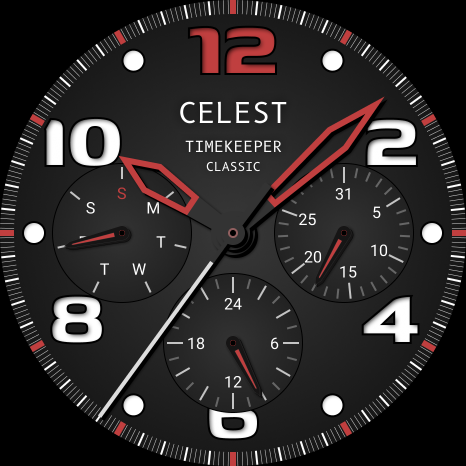
Three subdials, bold numerals and a seconds hand that sweeps. CELEST1760 Analog Watch is a classic analog watch face built the way a traditional three-register wristwatch is built, with a single accent color running through the hands, the markers and the small dials.
A finely toothed minute track runs the full rim of a dark dial, and the supporting information sits where you would expect to find it: the day of the week to the left of center, the date to the right, and a 24-hour indicator below. Any of those three small dials can hold your own data instead, so CELEST1760 Analog Watch works as a straight traditional dial or as a compact dashboard for steps, heart rate, battery or weather.
⌚ Features
- Dark dial with bold hour numerals and a fine toothed minute track
- Weekday dial left of center
- Date dial to the right
- 24-hour dial below
- Continuously sweeping seconds hand
🎨 Customization
- Gray and black background options
- 9 color options that recolor the accents, hands, markers and small dials together
- 3 optional complication placements, one for each small dial
- To use a complication, set its background in the settings so the built-in dial underneath is hidden
Traditional subdials when you want them, your own data when you don't.
✅ Compatible Devices
- Google Pixel Watch/2/3/4/5
- OnePlus Watch 2/2R/3/4
- Oppo Watch X2/X3
- Samsung Galaxy Watch 4/4 Classic/5/5 Pro/6/6 Classic/7/8/8 Classic/9/FE/Ultra (2024)/(2025)/Ultra 2
- Xiaomi Watch 2/2 Pro/5
🎁 BOGO Promotion: https://celest-watches.com/bogo/
✨ Explore the complete CELEST collection in one place — including all Wear OS, HUAWEI, and Apple Watch faces, along with our apps and tools — with the CELEST Catalog app: https://play.google.com/store/apps/details?id=com.celestwatches.catalog
🔧 Installation Help
Having trouble? We've got you covered:
- Use the dropdown menu next to "Install" on your phone to select your watch model or install directly from your watch's Play Store app.
- Updating weather data (if the watch face shows weather) may take time after installation but switching to another watch face and switching back or restarting both the watch and phone usually helps.
- Check out our installation and troubleshooting guide: https://celest-watches.com/installation-troubleshooting/
- Contact us at [email protected] for quick support
📞 Support & Community
📧 Support: [email protected]
📱 Follow @celestwatches on Instagram and subscribe to our newsletter to get notified of new releases and deals: https://celest-watches.com/newsletter/
Info App
Versione
Aggiornato il
Aug 05, 2026
Dimensione
Richiede Android
ID pacchetto
com.watchfacestudio.celest_ad1760
Installazioni
3.9K+
Categoria
Personalization
Novità
Updated to target Android 16 (API 36).
Autorizzazioni app
-
Other
- view network connections
- full network access

Valutazioni e recensioni
0.0
Valutazioni totali
5
4
3
2
1
L
L. J.
Sep 23, 2024
Please make a black background version. Thank you for your help. Love your work!
B
B R
Feb 10, 2024
I like it. It looks cool in orange , white , black colors and white wrist band
S
SM8855N
Feb 14, 2023
Good looking watch face but AOD aspect is such a letdown. Prefer AOD with exact same watch face as normal design.
A
Ankit Kamal
Sep 24, 2022
Keeping it simple and classy! Great buy!
B
Brendon Hall
Aug 24, 2022
Another fantastic design clean modern and sleek. Very well done
M
Magdy Said
Aug 03, 2022
Very cool


