

CELEST3010 Retro Digital Watch
Personalization
0.0
1.3K+ Download
"Retro LCD watch face with ghosted segments, date & 4 complication slots."
Installa su Google Play
App a pagamento




Info su questa app
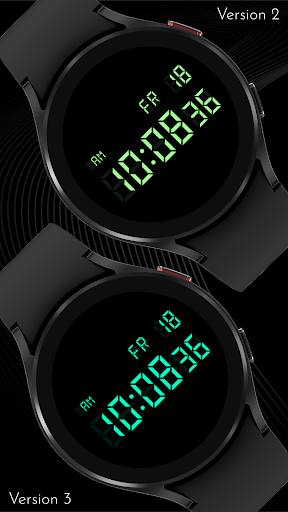
Retro digital, rendered like a real LCD: CELEST3010 Retro Digital Watch draws the unlit segments as well as the lit ones, faintly, the way an actual liquid crystal display shows its inactive elements against the panel.
That one detail is what makes it read as hardware rather than a font. The time runs large across the middle in seven-segment numerals, with AM/PM to the left and the weekday and date to the right, all in the same display type. The background stays pure black, which suits an OLED screen and keeps the segments sharp. Nine color options set the display, and four complication slots are available for heart rate, steps, weather, or whatever else you keep an eye on.
📟 Features
- Seven-segment display with ghosted inactive segments
- Large digital clock with AM/PM indicator
- Weekday and date in matching segment type
- Pure black background
- Four circular complication slots
🎨 Customization
- 9 color options
- 4 circular complication placement options
✅ Compatible Devices
- Google Pixel Watch/2/3/4/5
- OnePlus Watch 2/2R/3/4
- Oppo Watch X2/X3
- Samsung Galaxy Watch 4/4 Classic/5/5 Pro/6/6 Classic/7/8/8 Classic/9/FE/Ultra (2024)/(2025)/Ultra 2
- Xiaomi Watch 2/2 Pro/5
🎁 BOGO Promotion: https://celest-watches.com/bogo/
✨ Explore the complete CELEST collection in one place — including all Wear OS, HUAWEI, and Apple Watch faces, along with our apps and tools — with the CELEST Catalog app: https://play.google.com/store/apps/details?id=com.celestwatches.catalog
🔧 Installation Help
Having trouble? We've got you covered:
- Use the dropdown menu next to "Install" on your phone to select your watch model or install directly from your watch's Play Store app.
- Updating weather data (if the watch face shows weather) may take time after installation but switching to another watch face and switching back or restarting both the watch and phone usually helps.
- Check out our installation and troubleshooting guide: https://celest-watches.com/installation-troubleshooting/
- Contact us at [email protected] for quick support
📞 Support & Community
📧 Support: [email protected]
📱 Follow @celestwatches on Instagram and subscribe to our newsletter to get notified of new releases and deals: https://celest-watches.com/newsletter/
Info App
Versione
Aggiornato il
Aug 05, 2026
Dimensione
Richiede Android
ID pacchetto
com.watchfacestudio.celest_ad3010
Installazioni
1.3K+
Categoria
Personalization
Novità
Updated to target Android 16 (API 36).
Autorizzazioni app
-
Other
- view network connections
- full network access

Valutazioni e recensioni
0.0
Valutazioni totali
5
4
3
2
1
S
Stephen Calder
Mar 02, 2026
Excellent
S
Steve May
Nov 04, 2023
Simple and clean. Looks amazing on Amoled screen. Perfect 👌