

Chester Fusion watch face
Personalization




Info su questa app
HOW TO INSTALL (3 steps)
1. Before buying, make sure your watch runs Wear OS 6 or newer and is connected to your phone with the same Google account.
2. On this page, tap the ▼ arrow next to the Buy/Install button and select your WATCH as the device (not only your phone). Simplest way: buy it directly in Google Play on your watch.
3. On your watch, touch and hold the current watch face, swipe to the end of the list, tap "Add watch face" and choose Chester Fusion.
Not showing up after a few minutes? Keep both phone and watch online and open Google Play on the watch. Full guide: https://chesterwf.com/installation-instructions/
If the watch asks to pay again, check that it uses the same Google account.
COMPATIBILITY: round Wear OS 6+ smartwatches only (not for rectangular watches). Does NOT work on smartwatches or fitness bands that don't run Wear OS.
Features:
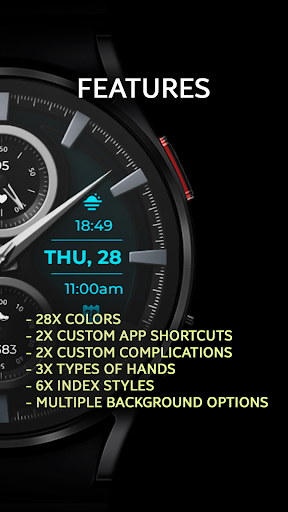
- 28 customizable screen colors: Choose from a wide range of colors to perfectly match your style.
- 2 customizable app shortcuts: Quick access to your favorite apps directly from the watch face.
- 2 customizable complication zones: Display essential information like steps, weather, or battery level.
- 3 types of hands: Personalize the look of the analog time display to suit your preference.
- 6 index styles: Highlight your device’s uniqueness by selecting from various index designs.
- Multiple background options: Change the watch face background to match your mood or style.
Chester Fusion not only offers a stylish design but also a wide range of customization options, making it the perfect choice for active and demanding users.
Compatible with all round Wear OS 6+ devices, such as Google Pixel Watch, Galaxy Watch 4, 5, 6, 7, Galaxy Watch Ultra, and more. Not suitable for rectangular watches.
Support and Resources:
- If you have any questions about installing the watch face: https://chesterwf.com/installation-instructions/
- Explore our other watch faces on the Google Play Store: https://play.google.com/store/apps/dev?id=6421855235785006640
Stay updated with our latest releases:
- Newsletter and website: https://ChesterWF.com
- Telegram channel: https://t.me/ChesterWF
- Instagram: https://www.instagram.com/samsung.watchface
For support, contact: [email protected]
Thank you!
Info App
Autorizzazioni app
-
Wearable sensors/Activity data
- body sensors (like heart rate monitors)
-
Other
- full network access
- reorder running apps
- control vibration
- prevent device from sleeping
- set an alarm


Valutazioni e recensioni
Not installing on my Galaxy 9
After MONTHS!!!! of searching for the right watch face i finally found it today!!! Excellent job by this creator!! #SamsungWatch7Ultra
Customization keeps locking up
Does not allow customization via phone. For me it Will not connect
Bought it few day's ago and still not able to get this on my watch as it keeps asking for a payment in watch app store. Disappointed with the installation procedure.
Thank you for the watch face, it's outstanding 👏🏻 5⭐️⭐️⭐️⭐️⭐️


