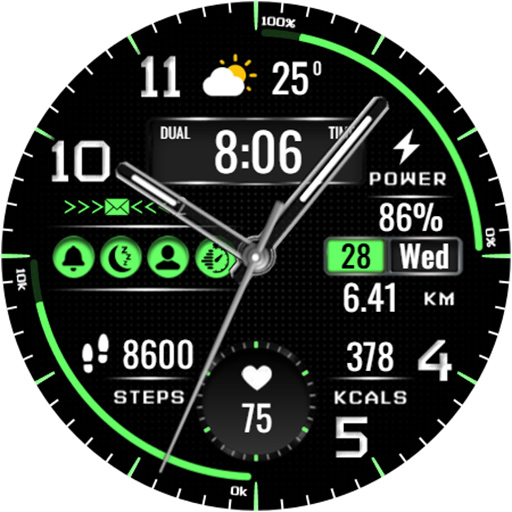
Classic LCD V3 watch face
Personalization
0.0
1.6K+ Download
"Classic Hybrid LCD minimalistic multifunctional watchface"
Installa su Google Play
App a pagamento


Info su questa app
Stylish Hybrid LCD watch face for every day for Wear OS
Features at a Glance:
- High resolution
- Digital time in 12\24 hour format
- Ability to change the color of the arrows
- Ability to change styles (backgrounds)
- Custom complications
- AOD mode full and minimal
Compatible with Wear OS devices running API level 30 and above, including Samsung Galaxy Watch 4, 5, 6, 7, 8 and Pixel Watch.
**Installation**
1. Install the watch face app on your phone.
2. Make sure your Wear OS watch is connected to your phone and uses the same Google account.
3. Select your watch as the installation device and complete the installation.
4. After installation, select the watch face from your watch face gallery.
If installation is delayed, check the internet connection on both devices, wait a minute or two, or restart your watch and try again.
**Customization**
• Touch and hold the watch face, then tap **Customize** to access the available settings.
• For the best experience, we recommend configuring the watch face directly on your watch. Video guide:
https://youtu.be/YPcpvbxABiA
**Support**
If you have any questions or installation issues, please contact: [email protected]
**More watch faces by WIN**
Explore other watch faces:
https://play.google.com/store/apps/dev?id=6789054753742990227
Features at a Glance:
- High resolution
- Digital time in 12\24 hour format
- Ability to change the color of the arrows
- Ability to change styles (backgrounds)
- Custom complications
- AOD mode full and minimal
Compatible with Wear OS devices running API level 30 and above, including Samsung Galaxy Watch 4, 5, 6, 7, 8 and Pixel Watch.
**Installation**
1. Install the watch face app on your phone.
2. Make sure your Wear OS watch is connected to your phone and uses the same Google account.
3. Select your watch as the installation device and complete the installation.
4. After installation, select the watch face from your watch face gallery.
If installation is delayed, check the internet connection on both devices, wait a minute or two, or restart your watch and try again.
**Customization**
• Touch and hold the watch face, then tap **Customize** to access the available settings.
• For the best experience, we recommend configuring the watch face directly on your watch. Video guide:
https://youtu.be/YPcpvbxABiA
**Support**
If you have any questions or installation issues, please contact: [email protected]
**More watch faces by WIN**
Explore other watch faces:
https://play.google.com/store/apps/dev?id=6789054753742990227
Info App
Versione
Aggiornato il
Oct 08, 2026
Dimensione
Richiede Android
ID pacchetto
com.watchfacestudio.classicLCDV3
Installazioni
1.6K+
Categoria
Personalization
Novità
New colors added
Autorizzazioni app
-
Wearable sensors/Activity data
- body sensors (like heart rate monitors)
-
Other
- full network access
- reorder running apps
- control vibration
- prevent device from sleeping


Valutazioni e recensioni
0.0
Valutazioni totali
5
4
3
2
1
G
Global Citizen
Nov 12, 2025
Very nice... My recent favorite.
J
Jeremy King
Nov 11, 2025
I love a combination analog/digital face. Add to that all the customization you can do and you get a clean, usable watch face. Great design.
h
hessin ayman
Nov 11, 2025
great customization and awesome colors
s
sfreud
Nov 04, 2025
too expensive for what offer.
K
Keith Ferguson
Jun 08, 2024
Great watch face thanks 😊 👍
A
Ali Manzoor
Mar 07, 2024
I like this face watch layout, EyeCatche and beautiful ...