

WIN - DGT BLACK 25
Personalization
5.0
620 Download
"Stylish, sporty, informative watch Face for every day"
Installa su Google Play
App a pagamento




Info su questa app
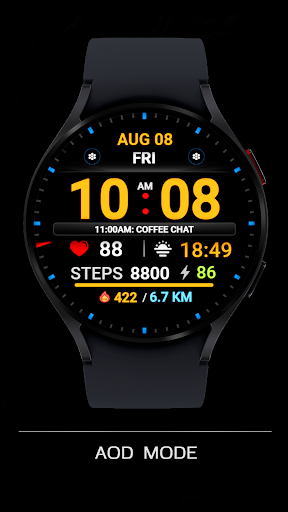
Stylish, sporty, informative watch Face with large numbers for every day, for Wear OS
Basic moments:
- 12/24 hour digital time (depending on smartphone settings)
- A high resolution;
- Ability to change color
- Ability to change style (backgrounds)
- Custom complications
- AOD mode (full or minimum mode)
Compatible with Wear OS devices running API level 30 and above, including Samsung Galaxy Watch 4, 5, 6, 7, 8 and Pixel Watch.
**Installation**
1. Install the watch face app on your phone.
2. Make sure your Wear OS watch is connected to your phone and uses the same Google account.
3. Select your watch as the installation device and complete the installation.
4. After installation, select the watch face from your watch face gallery.
If installation is delayed, check the internet connection on both devices, wait a minute or two, or restart your watch and try again.
**Customization**
• Touch and hold the watch face, then tap **Customize** to access the available settings.
• For the best experience, we recommend configuring the watch face directly on your watch. Video guide:
https://youtu.be/YPcpvbxABiA
**Support**
If you have any questions or installation issues, please contact: [email protected]
**More watch faces by WIN**
Explore other watch faces:
https://play.google.com/store/apps/dev?id=6789054753742990227
Info App
Versione
Aggiornato il
Oct 03, 2026
Dimensione
Richiede Android
ID pacchetto
com.watchfacestudio.dgtblack25
Installazioni
620
Categoria
Personalization
Novità
Wear OS update:
- new text colors have been added at your request
Autorizzazioni app
-
Other
- full network access
- Google Play license check

Valutazioni e recensioni
5.0
Valutazioni totali
5
4
3
2
1
M
Mohab A
Aug 21, 2026
as usual a great watch face from a respected developer
s
sunil yadav
Aug 02, 2026
no km show plz provide km in distance
L
LaMont B.
Nov 28, 2025
Simply designed, easy to read, and contains just enough configurable elements to satisfy my needs. Thank you.
P
Patrik Sodoma
Oct 10, 2025
informative and clean!
m
margabandhu b
Oct 03, 2025
excellent watch face' kudos to developer, recommend to everyone, impress lot , thank you
J
Jeremy King
Oct 03, 2025
A crisp, clean, readable sport/digital face. Probably a daily usage for me. 👍


