

JW331 jwstudio
Personalization
0.0
35 Download
"High-quality watchfaces for Wear OS 5.0 of higher"
Installa su Google Play
App a pagamento


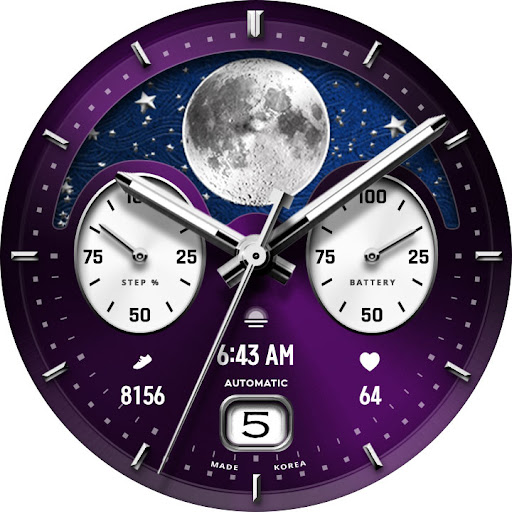
Info su questa app
This watch face supports all WearOS 5 devices with API level 34 or higher, such as Samsung Galaxy Watch 4, 5, 6, 7, 8, Pixel Watch, etc.
+++++++++++++++++++++++++++++++++++++++++++++++
[How to install]
Before pressing the payment button, make sure your watch is selected.
Select your watch by pressing the small triangle next to the payment button.
Select the menu at the top right of the Play Store app (three dots) > Share > Chrome browser > Install on other devices > Clock and proceed.
After installation, select it from the download list, register it as a favorite, and use it. You can view the download list by clicking 'Add Watch Screen' on the far right of the favorites list that appears when you press the watch screen.
+++++++++++++++++++++++++++++++++++++++++++++++
[Features]
- 14 Background Colors
- 4 Pattern Style
- 10 Sub dial Colors
- 5 Index Style
- 5 Hands Style
- AOD Simple mode
[function]
- 3 preset app shortcut
- 1 customizable shortcut keys
- 3 customizable fields/information display
+++++++++++++++++++++++++++++++++++++++++++++++
[Custom]
1 - Touch and hold the display.
2 - Tap on Custom Options
For inquiries, please contact the email below.
[email protected]
Info App
Versione
Aggiornato il
N/A
Dimensione
Richiede Android
ID pacchetto
com.watchfacestudio.jwstudio_a_331
Installazioni
35
Categoria
Personalization
Valutazioni e recensioni
0.0
Valutazioni totali
5
4
3
2
1
a
ainsley douglas
Apr 02, 2026
awesome
R
Ricko G
Mar 22, 2026
not works well on samsung ultra, not precision. i can show you the picture real sent me your mail


