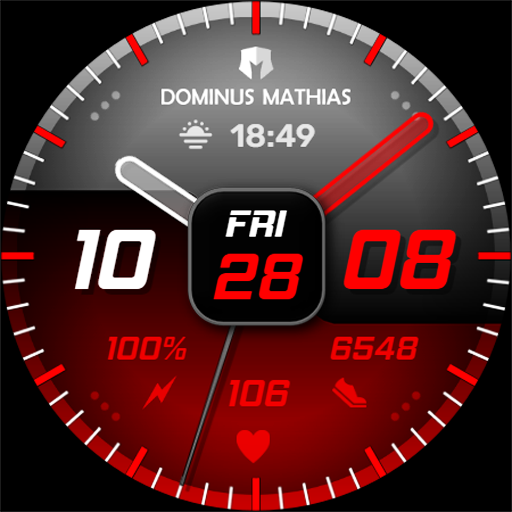
Key WF26 Hybrid Watch Face
Personalization
0.0
635 Download
"Key WF26 is a Hybrid Watch Face with a Modern Design for Wear OS"
Installa su Google Play
App a pagamento


Info su questa app
Buy One Get One, BOGO Promotion :
1. Buy any of our Watch Faces
2. Send email to [email protected]
3. Attach RECEIPT from Google to the email
4. Wait for the Coupon
5. You can not choose the free WF
Key WF26 is a Hybrid Watch Face with a Modern Design for Wear OS. Key WF26 has 3 pointers on battery information, heart rate and steps count. This makes Key WF26 look like a smartwatch with a modern look. Users can choose from 12 color themes for your smartwatch display.
Features
- Analog Watch Hand for Hour and Minute
- Heart Rate Information
- Step Count Information
- Battery Percent Information
- Have 12 theme colors
- 1 Custom Shortcuts
- 1 short circle complications.
IMPORTANT!
This is a Wear OS Watch Face app. This app only supports smartwatch devices running with WEAR OS
AOD:
Display hybrid clock information with additional Custom Shortcuts and short circle complications.
Color adjustments:
1. Press and hold your finger at center on the watch display.
2. Press the button to adjust.
3. Swipe left or right to switch between the different customizable items.
4. Swipe up or down to change the options/color of the items.
1. Buy any of our Watch Faces
2. Send email to [email protected]
3. Attach RECEIPT from Google to the email
4. Wait for the Coupon
5. You can not choose the free WF
Key WF26 is a Hybrid Watch Face with a Modern Design for Wear OS. Key WF26 has 3 pointers on battery information, heart rate and steps count. This makes Key WF26 look like a smartwatch with a modern look. Users can choose from 12 color themes for your smartwatch display.
Features
- Analog Watch Hand for Hour and Minute
- Heart Rate Information
- Step Count Information
- Battery Percent Information
- Have 12 theme colors
- 1 Custom Shortcuts
- 1 short circle complications.
IMPORTANT!
This is a Wear OS Watch Face app. This app only supports smartwatch devices running with WEAR OS
AOD:
Display hybrid clock information with additional Custom Shortcuts and short circle complications.
Color adjustments:
1. Press and hold your finger at center on the watch display.
2. Press the button to adjust.
3. Swipe left or right to switch between the different customizable items.
4. Swipe up or down to change the options/color of the items.
Info App
Versione
Aggiornato il
N/A
Dimensione
Richiede Android
ID pacchetto
com.watchfacestudio.keywf26
Installazioni
635
Categoria
Personalization
Valutazioni e recensioni
0.0
Valutazioni totali
5
4
3
2
1
R
Roger Hallsworth
Jul 14, 2024
Nice face but would be a 5 star if there were more you could change as the only thing you can change is colour
D
Dan Herrick
Jul 01, 2024
Nice looking watch face.