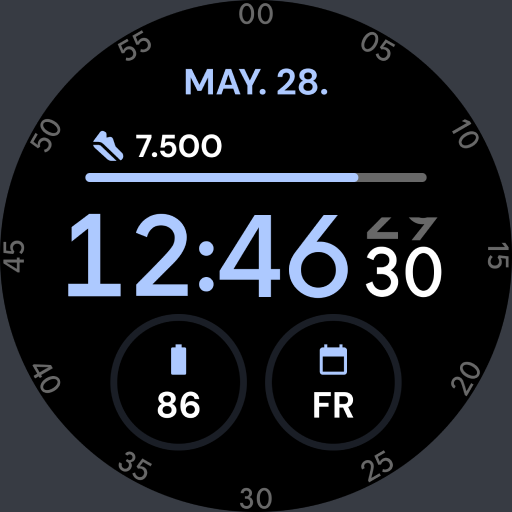
Key WF40 Digital Watch Face
Personalization
0.0
1.2K+ Download
"Key WF40 is a Digital Watch Face with a Simple Design for Wear OS"
Installa su Google Play
App a pagamento


Info su questa app
Buy One Get One, BOGO Promotion :
1. Buy any of our Watch Faces
2. Send email to [email protected]
3. Attach RECEIPT from Google to the email
4. Wait for the Coupon
5. You can not choose the free WF
Key WF40 is a Digital Watch Face with a Simple Design for Wear OS. Key WF40 displays a simple design but still looks futuristic with the addition of a very elegant color theme.
Features
- 12/24H digital time format
- Month, Date, and Day Name
- Heart Rate Information
- Step Count Information
- Battery Percent Information
- 2 Custom Shortcuts
- 1 short circle complications.
- Change the Background colours.
IMPORTANT!
This is a Wear OS Watch Face app. This app only supports smartwatch devices running with WEAR OS
AOD:
Display the digital clock on your smartwatch with all the information you need.
Color adjustments:
1. Press and hold your finger at center on the watch display.
2. Press the button to adjust.
3. Swipe left or right to switch between the different customizable items.
4. Swipe up or down to change the options/color of the items.
1. Buy any of our Watch Faces
2. Send email to [email protected]
3. Attach RECEIPT from Google to the email
4. Wait for the Coupon
5. You can not choose the free WF
Key WF40 is a Digital Watch Face with a Simple Design for Wear OS. Key WF40 displays a simple design but still looks futuristic with the addition of a very elegant color theme.
Features
- 12/24H digital time format
- Month, Date, and Day Name
- Heart Rate Information
- Step Count Information
- Battery Percent Information
- 2 Custom Shortcuts
- 1 short circle complications.
- Change the Background colours.
IMPORTANT!
This is a Wear OS Watch Face app. This app only supports smartwatch devices running with WEAR OS
AOD:
Display the digital clock on your smartwatch with all the information you need.
Color adjustments:
1. Press and hold your finger at center on the watch display.
2. Press the button to adjust.
3. Swipe left or right to switch between the different customizable items.
4. Swipe up or down to change the options/color of the items.
Info App
Versione
Aggiornato il
Aug 15, 2026
Dimensione
Richiede Android
ID pacchetto
com.watchfacestudio.keywf40
Installazioni
1.2K+
Categoria
Personalization
Valutazioni e recensioni
0.0
Valutazioni totali
5
4
3
2
1
S
Shauna B
Sep 08, 2024
Awesome job. I really enjoy your watchfaces