

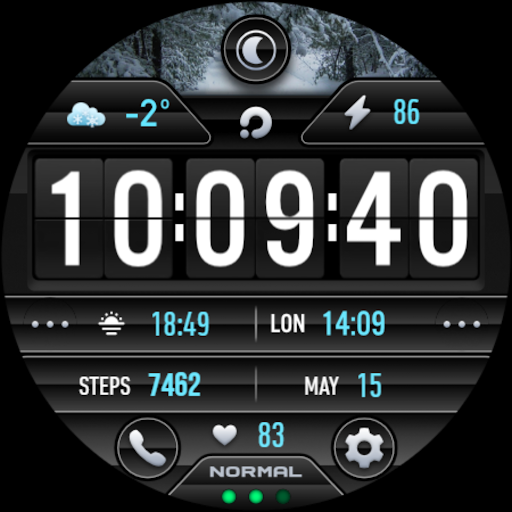
PRADO 29 Weather Watch Face
Personalization


Info su questa app
https://t.me/pradodesign
Only for Wear OS devices
ATTENTION
If you see the message "Your devices are not compatible", go to the Play Store in your browser.
BUY 1 GET 1
https://pradodesignbr.com/BOGO
Features:
Weather data is updated according to your location.
1. 12h/24h based on your phone settings
2. Date
3. Heart Rate
4. Battery Level
5. Moon Phases
6. Changeable background and colors
7. Multi Language
8. 4 Customizable Fields
9. Watch Face Format
10. Always On Display
11. Shortcuts
Touch and hold the display to customize your watch face.
For full functionality please manually enable sensors and receive complication data permissions!
SETTING WEATHER COMPLICATION
Press and hold the center of the watch > customize > choose a major complication and choose your weather complication provider.
The weather app needs to have the weather location set before it can set a complication.
We recommend the SimpleWeather app
https://play.google.com/store/apps/details?id=com.thewizrd.simpleweather
HEART RATE
Allow access to heart rate after installing the watch face.
The shortcut does not open the Heart Rate app, but starts the measurement.
Tap the heart icon to start measuring heart rate.
Make sure the watch screen is turned on and that you are wearing it correctly on your wrist when measuring your heart rate.
Newsletter
Sign up to stay updated with new watch faces and promotions!
https://stats.sender.net/forms/bYgPKe/view
Website
https://pradodesignbr.com
https://www.instagram.com/pradodesignbr
https://www.facebook.com/pradodesignbr
Info App
Novità
- Bugs fixed.
Autorizzazioni app
-
Other
- Google Play license check

Valutazioni e recensioni
Great watch faces, love them all. Hard to pick just one, so get more lol.
Does not work on Pixel Watch 3. No customization options available.
Thank you for this amazing watchface
I was expecting the background to automatically change upon weather change, but it seems it's just about day/night. Weather application is not working as shown - showing town instead of degrees. I know it's Samsung's fault. Just keep that in mind. Otherwise, looks pretty decent.
I love the design and the customizable fields! I also like the different colors and other options.
awesome
App simili

PER23 Digital Watch Face

OMG 38 - Digital Watch Face

CNRwatch001

Multifunctional Flip ZKinWatch

ZKin Watch Symmetrical Gray

NTV535 - Modern View Sport II
Altro dallo sviluppatore

PRADO 99 Weather Watch Face

PRADO 98 Weather Watch Face

PRADO 97 Weather Watch Face

PRADO 96 Weather Watch Face

PRADO 95 Weather Watch Face
