

Watch face 10h08.com #145
Personalization
0.0
187 Download
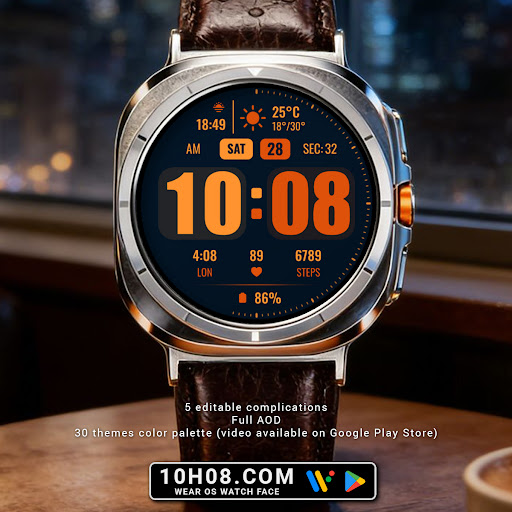
"5 editable complications. Full AOD. 30 themes color palette."
Installa su Google Play
App a pagamento




Info su questa app
⌚️ Watch face 10h08.com #145
User manual:
1. The watch face only works for devices running Wear OS 5 or later
Check in Watch settings - Watch info - Software info - Wear OS version
2. Your weather shows "?". Open Galaxy Wearable app - Watch settings - Apps - Find Weather app and open it - Settings - Enable location, local, adjust units,...
* With Wear OS 6 and One UI 8 or later, please open the Weather app on your watch, then tap settings to configure.
🟥 Information:
- High resolution, sharp images
- Classic and elegant design
- Digital time
- Day & date
- Weather information
- Sunrise & sunset
- World clock
- Heart rate
- Steps count
- Battery level
- 5 editable complications: battery level, sunrise & sunset, heart rate, world clock, steps count
- Full AOD
- 30 themes color palette (video available on Google Play Store)
🟨 How to custom this watch face?
1. Press and hold watch face screen
2. Tap “Customize” button
3. Swipe left or right, up or down to customize watch face
🟦 How to install watch face on your watch?
1. Install watch face from Google Play store
2. Press and hold watch face screen
3. Swipe right to left and tap “Add watch face”
4. Scroll to the bottom of the page and selectwatch face in the “downloaded” section
🟧 Compatible with smart watches running Wear OS 5+ SDK 34+
For example: Galaxy Watch 6, Galaxy Watch 7 Ultra, Ticwatch Pro 5, Pixcel Watch 2, Watch 2 Pro,...
🟩 See all my watch faces: https://play.google.com/store/apps/dev?id=5487081600241990978
🟪 Follow my social media pages for the latest watch face updates:
https://10h08.com
https://facebook.com/10h08
https://www.youtube.com/@10h08com/shorts
Info App
Versione
Aggiornato il
Mar 13, 2026
Dimensione
Richiede Android
ID pacchetto
com.watchfacestudio.wf10h08com145
Installazioni
187
Categoria
Personalization
Novità
Release
Valutazioni e recensioni
0.0
Valutazioni totali
5
4
3
2
1
M
Marc Allen
May 14, 2026
Sporty look and polished graphics 👍
I
IX
Mar 16, 2026
Another wonderful face! I own almost all of your designs! Great work my friend!


