Spring Ultra Watch Face
Personalization
0.0
54 Download
"Spring Ultra Watch Face for Wear OS"
Installa su Google Play
App a pagamento


Info su questa app
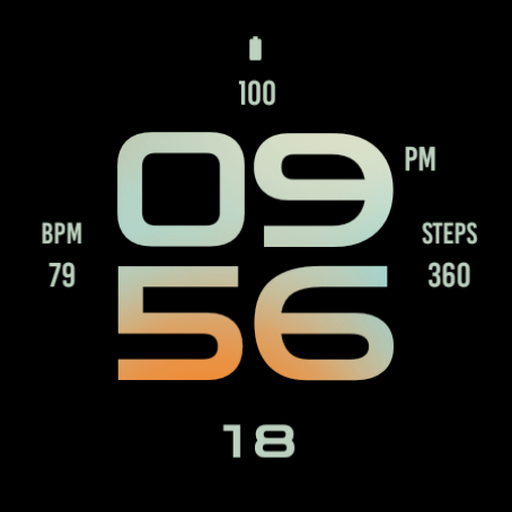
Experience the perfect blend of style and functionality with the Spring Ultra Watch Face for Wear OS. This elegantly designed watch face features vibrant seasonal graphics, customizable shortcut/complication, and responsive performance tailored for your smartwatch device.
With its easy-to-read display, you can effortlessly keep track of time, weather updates, and fitness metrics, making it an ideal companion for your active lifestyle. Elevate your smartwatch experience with the Spring Ultra Watch Face and embrace a refreshing look every day.
Main Features:
- Digital time display
- 12/24 hours mode based on device settings
- AM/PM marker
- Battery level status
- Date
- Customizable widget complications
- Customizable app shortcut
- Always on display
- Built for Wear OS smartwatches
Custom Widget Complications:
- SHORT_TEXT complication
- SMALL_IMAGE complication
- ICON complication
Installation:
- Make sure the watch device is connected to the phone
- On the Play Store, select your watch device from the install drop-down button. Then tap install.
- After a few minutes the watch face will installed on your watch device
- Alternatively, you can install the watch face directly from on-watch Play Store by searching this watch face name between quotation marks.
Note:
Widget complications shown in the application description are for promotional only. Custom widget complications data depends on your installed applications and watch manufacturer software. The companion app is only to make it easier to find and install the watch face on your Wear OS watch device.
With its easy-to-read display, you can effortlessly keep track of time, weather updates, and fitness metrics, making it an ideal companion for your active lifestyle. Elevate your smartwatch experience with the Spring Ultra Watch Face and embrace a refreshing look every day.
Main Features:
- Digital time display
- 12/24 hours mode based on device settings
- AM/PM marker
- Battery level status
- Date
- Customizable widget complications
- Customizable app shortcut
- Always on display
- Built for Wear OS smartwatches
Custom Widget Complications:
- SHORT_TEXT complication
- SMALL_IMAGE complication
- ICON complication
Installation:
- Make sure the watch device is connected to the phone
- On the Play Store, select your watch device from the install drop-down button. Then tap install.
- After a few minutes the watch face will installed on your watch device
- Alternatively, you can install the watch face directly from on-watch Play Store by searching this watch face name between quotation marks.
Note:
Widget complications shown in the application description are for promotional only. Custom widget complications data depends on your installed applications and watch manufacturer software. The companion app is only to make it easier to find and install the watch face on your Wear OS watch device.
Info App
Versione
Aggiornato il
N/A
Dimensione
Richiede Android
ID pacchetto
wear.watchfaces.springultrawatchface
Installazioni
54
Categoria
Personalization
App simili

Simple Wildflowers Watch Face
Monkey's Dream
4.6

TVV Spring Flowers Watch Face
TVVisuals
4.5

Blossom Floral Watch Face
Shagun Clock Watch Faces
0.0

Garden Steps floral watch face
Monkey's Dream
4.8

Bloom Digital Watch Face
Monkey's Dream
0.0

Pastel Floral Watch Face
Monkey's Dream
0.0