

Digiwatch WatchFace
Personalization
4.2
494 ダウンロード
"digital watch face designed for Wear OS with 15 color schemes."
Google Playでインストール
有料アプリ




このアプリについて
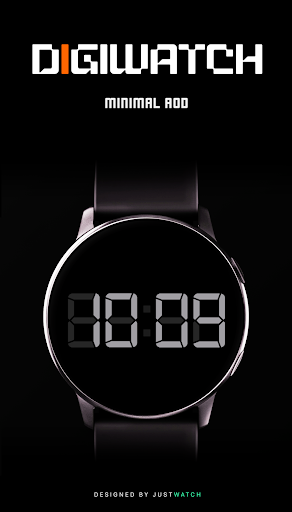
Digiwatch is a modern, high-contrast digital watch face that brings essential data to your wrist with clarity and style.
FEATURES
• Digital 12/24 hour time display
• Date and Day of the week
• Real-time Heart Rate monitoring
• Battery percentage indicator with charging status
• Step counter with visual progress bar
• Advanced Always-On Display (AOD) supported
• Optimized for battery efficiency
CUSTOMIZATION
• 10+ Unique Color Schemes: Change the look to match your style.
• Compatible with Galaxy Watch, Pixel Watch, and other Wear OS devices.
INSTALLATION
1. Ensure your watch is connected to your smartphone via Bluetooth.
2. Open the Play Store on your smartphone and search for 'Digiwatch'.
3. Select your watch device from the 'Install' dropdown menu.
4. Wait for the installation to complete. The watch face will appear in your watch's face selection menu.
Designed for Wear OS.
FEATURES
• Digital 12/24 hour time display
• Date and Day of the week
• Real-time Heart Rate monitoring
• Battery percentage indicator with charging status
• Step counter with visual progress bar
• Advanced Always-On Display (AOD) supported
• Optimized for battery efficiency
CUSTOMIZATION
• 10+ Unique Color Schemes: Change the look to match your style.
• Compatible with Galaxy Watch, Pixel Watch, and other Wear OS devices.
INSTALLATION
1. Ensure your watch is connected to your smartphone via Bluetooth.
2. Open the Play Store on your smartphone and search for 'Digiwatch'.
3. Select your watch device from the 'Install' dropdown menu.
4. Wait for the installation to complete. The watch face will appear in your watch's face selection menu.
Designed for Wear OS.
アプリ情報
新機能
1.0
• Initial Release.
• Initial Release.
アプリの権限
-
Wi-Fi connection information
- view Wi-Fi connections
-
Other
- view network connections
- pair with Bluetooth devices
- full network access
- Google Play license check


評価とレビュー
4.2
総評価数
5
4
3
2
1
S
Saad Akhtar
Aug 04, 2026
Love it 😍
Q
QuesoTheKid
Jun 07, 2026
Cool
t
tearle lankford
Apr 07, 2026
awesome work
R
Rajat kumar Pattanaik
Mar 24, 2026
Truly a Master piece
D
Dan Marder
Mar 23, 2026
This is my new favorite watch face. It is so easy to read. It looks great! Thanks for designing it. 👍
G
Global Citizen
Mar 06, 2026
Wow... What a great looking face... Big digits really go great with my watch ultra.


