

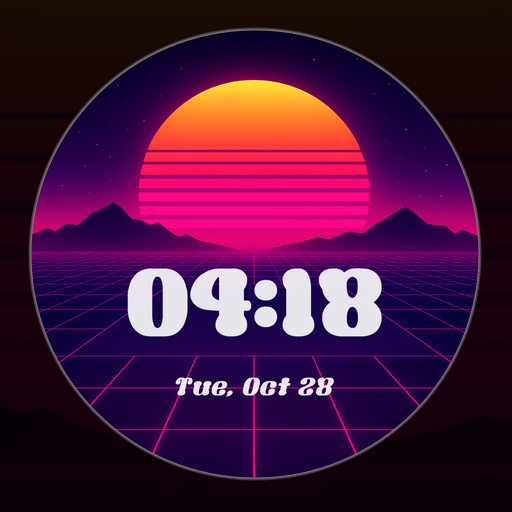
Vaporwave Watch Face
Personalization


このアプリについて
Introduction
This is a native, standalone Wear OS watch face. This means that it can be installed on many smartwatches running this OS (like Samsung, Mobvoi Ticwatch, Fossil, Oppo, the latest Xiaomi and more).
It is completely handcrafted, to be unique.
Features
The watch face includes:
◉ 30 color schemes
◉ Animated glowing grid
◉ Weather and temperature
◉ A massive number of different customization options (420 MILLIONS of combinations)
◉ Amoled friendly, custom and optimized AOD
◉ Real day night cycle, the moon reflect the actual moon phase!
◉ Reacts to low battery and other events
◉ 7 customizable complications, many touch actions
◉ Round and square watches supported!
◉ 12/24h format, automatic date format
◉ Easy to use (and uninstallable) companion app
Installation
The installation is straightforward, don't worry!
Here's the procedure and a quick Q&A:
◉ Install this app in your smartphone
◉ Open it, and connect your Wear OS smartwatch to your device
◉ If the watch is connected, you will be able to tap the "view and install on smartwatch" button. (if not, refer to the Q&A below)
◉ Check your watch, you should see my watch face and the install button (if you see the price instead, refer to the Q&A below)
◉ Install it in your smartwatch
◉ Long press on your current watch face
◉ Swipe left until you see a "+" button, tap on it
◉ Look for the new watch face, tap on it
◉ Done. If you want, you can uninstall the companion app now!
Q&A
Q - I'm being charged twice! / The watch is asking me to pay again / you're a [derogatory adjective]
A - Keep calm. This happens when the account you’re using on the smartphone is different from the account used on the smartwatch. You have to use the same account (else, Google has no way to know that you already bought the watch face).
Q - I can't press the button in the companion app but my smartwatch is connected, why?
A - Most probably, you're using an incompatible device, like an old Samsung smartwatch or any other non-Wear OS smartwatch/smartband. You can easily check on Google if your device runs Wear OS before installling any watch face. If you're sure you have a Wear OS device and still you can't press the button, open the Play Store on your watch and search for my watch face manually!
Q - I have a Wear OS device, but it's not working! I'm gonna leave a one star review 😏
A - Stop right there! Most definitely there's an issue on your side while following the procedure, so please just send me an email (i usually reply during the weekends) and don't damage me with a bad and misleading review!
Q - The [name of a feature] is not working!
A - Try setting another watch face and then set mine again, or try allowing the permissions manually (on the watch obviously). If it still doesn't work, there's an handy "email button" in the companion app!
Support
If you need help or you have a suggestion, feel free to send me an email, I'll do my best to help.
I usually reply during the weekend because I'm just one person (not a company) and I have a job, so be patient!
This app is supported and updated to fix bugs and add new features. The overall design won't change, but it will surely be improved over time!
I know that the price isn't the lowest, but I worked a lot of hours on each watch face and the price also includes the support and the updates, if you think about it. And i assure you, I'll invest any earning on useful things and to help my family. Oh, and thanks for reading the full description! Nobody does it!
アプリ情報
新機能
アプリの権限
-
Wearable sensors/Activity data
- body sensors (like heart rate monitors)
-
Other
- reorder running apps
- control vibration
- prevent device from sleeping
- set an alarm


評価とレビュー
Been looking for a cool watch face, and this has been my favorite! Lots of cool color schemes and different image options and all look super cool.
Very cool and moody WF. The animation is so smooth and hypnotizing. The customization amount is astonishing. Very unique WF.
A really nice design that not only feels like it was designed by someone with taste in the genre of vaporwave, but by someone who wears watches and understands the need for legibility. Overall a real solid design.
Just WOW! The animation is so smooth, I haven't seen such a smooth animation on any other watchface previously. Also, the moon phase implementation is just genius. Such a huge amount of customization, deeply thought out. Your job, passion, and efforts put into development deserve the highest rate and much more attention. Keep up the great job!
I'm lucky I get to customize my new watch face.
Edit: I appreciate your help. Edit: The month is where the day should be and the day is where the month should be. Awesome watch face. I love the graphics and insane amount of customisation. One huge gripe with it, though, is that the day and month are mixed up.
類似のアプリ

80s Vibes

Neon Dusk Pro

RHS 128 WR Retro Arcade

Retro Racing Track
Waface DW04 : Retro Watchface

SamWatch Pixel E
この開発者の他のアプリ

Atomic Tic Watch Face

Present Line Watch Face

Animated Tech Spark Watch Face

Starry Night Depth Watch Face

Jet HUD Watch Face
