CELEST5606 Military Watch
Personalization


このアプリについて
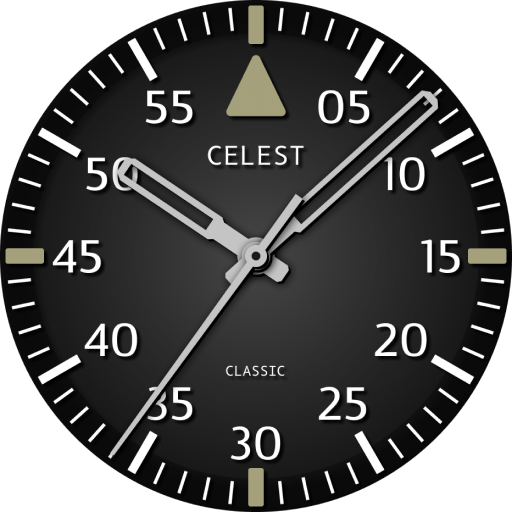
A day and date window sits at three o'clock, and the seconds hand carries a bright tip that stands out against the dark dial without pulling attention from the hour. The 24-hour ring is the part that earns its keep — read 14 or 22 straight off the dial instead of doing the arithmetic. Central branding can be hidden for a clean, unmarked display, and three optional circular complications put weather, heart rate, or your next appointment where you want them.
⚡ Features
- Rugged field-watch layout with high-legibility printed numerals
- Full 24-hour scale inside the 12-hour numerals
- Day and date window at three o'clock
- Marked bezel with a minute track around the dial
- Seconds hand with a bright contrasting tip
- Three optional circular complications
🎨 Customization
- 20 color combinations for the markers, numbers, and hands
- 6 bezel options
- 7 background options
- 5 always-on display colors (no preview while customizing)
- Option to hide the branding for an unmarked dial
✅ Compatible Devices
- Google Pixel Watch/2/3/4/5
- OnePlus Watch 2/2R/3/4
- Oppo Watch X2/X3
- Samsung Galaxy Watch 4/4 Classic/5/5 Pro/6/6 Classic/7/8/8 Classic/9/FE/Ultra (2024)/(2025)/Ultra 2
- Xiaomi Watch 2/2 Pro/5
🎁 BOGO Promotion: https://celest-watches.com/bogo/
✨ Explore the complete CELEST collection in one place — including all Wear OS, HUAWEI, and Apple Watch faces, along with our apps and tools — with the CELEST Catalog app: https://play.google.com/store/apps/details?id=com.celestwatches.catalog
🔧 Installation Help
Having trouble? We've got you covered:
- Use the dropdown menu next to "Install" on your phone to select your watch model or install directly from your watch's Play Store app.
- Updating weather data (if the watch face shows weather) may take time after installation but switching to another watch face and switching back or restarting both the watch and phone usually helps.
- Check out our installation and troubleshooting guide: https://celest-watches.com/installation-troubleshooting/
- Contact us at [email protected] for quick support
📞 Support & Community
📧 Support: [email protected]
📱 Follow @celestwatches on Instagram and subscribe to our newsletter to get notified of new releases and deals: https://celest-watches.com/newsletter/
アプリ情報
新機能
アプリの権限
-
Other
- view network connections
- full network access
- Google Play license check

評価とレビュー
Crisp & clear watchface. Very easy to see the time.
I have the Samsung Ultra (2025) and try as I might the AOD colour option has no effect, I can't change the colour of the hands. Colour, bezel & background work.
awesome watchface. reminds me of the Luminox I always wanted but never could afford. Great work!
This watch face is amazing! Perfect blend of tacti-cool and functional with optional complications!
This is an an excellent clear uncluttered watch face with features for extra personal preferences. Great job!
it's perfect!