

CELEST5658 Sport Watch
Personalization
0.0
286 ダウンロード
"Digital sport watch face with steps, heart rate, battery & 30 color options."
Google Playでインストール
有料アプリ



このアプリについて
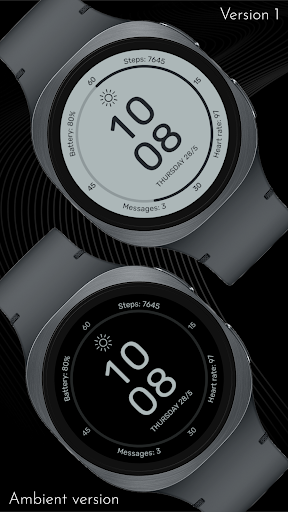
Digital and built for reading at a glance: CELEST5658 Sport Watch puts a large central time display at the middle of the dial and arranges the data you check most around it. Wear OS 5+ required (for weather functions) — Galaxy Watch, Pixel Watch, and all Wear OS 5+ devices.
Battery status, step tracking, heart rate, and message alerts sit at the edges of the circular dial, balanced so nothing competes with the time. The result is a clear hierarchy that lets you pick out a single number without scanning the whole watch face. Four optional circular complications extend that framework with the data streams you want, and 30 color variations keep the display legible in anything from bright sun to a dark room.
⚡ Features
- Large central digital time display
- Battery status, steps, and heart rate around the dial
- Message alerts in view without opening anything
- Structured peripheral layout with a clear data hierarchy
- Four optional circular complications
🎨 Customization
- 30 color variations
- Four optional color-matched circular complications
- Three invisible complication spots above weather, steps, and messages, so you can point those shortcuts at any app on your watch
A note on the invisible spots: these apps use different app IDs on different watch models, so unlike battery they can't be hard-coded. Assigning them yourself means the shortcuts open the right app on your particular watch.
✅ Compatible Devices
- Google Pixel Watch/2/3/4/5
- OnePlus Watch 2/2R/3/4
- Oppo Watch X2/X3
- Samsung Galaxy Watch 4/4 Classic/5/5 Pro/6/6 Classic/7/8/8 Classic/9/FE/Ultra (2024)/(2025)/Ultra 2
- Xiaomi Watch 2/2 Pro/5
🎁 BOGO Promotion: https://celest-watches.com/bogo/
✨ Explore the complete CELEST collection in one place — including all Wear OS, HUAWEI, and Apple Watch faces, along with our apps and tools — with the CELEST Catalog app: https://play.google.com/store/apps/details?id=com.celestwatches.catalog
🔧 Installation Help
Having trouble? We've got you covered:
- Use the dropdown menu next to "Install" on your phone to select your watch model or install directly from your watch's Play Store app.
- Updating weather data (if the watch face shows weather) may take time after installation but switching to another watch face and switching back or restarting both the watch and phone usually helps.
- Check out our installation and troubleshooting guide: https://celest-watches.com/installation-troubleshooting/
- Contact us at [email protected] for quick support
📞 Support & Community
📧 Support: [email protected]
📱 Follow @celestwatches on Instagram and subscribe to our newsletter to get notified of new releases and deals: https://celest-watches.com/newsletter/
アプリ情報
バージョン
更新日
Aug 05, 2026
サイズ
Android要件
パッケージID
com.watchfacestudio.celest5658
インストール数
286
カテゴリ
Personalization
新機能
Updated to target Android 16 (API 36).
アプリの権限
-
Other
- view network connections
- full network access
- Google Play license check

評価とレビュー
0.0
総評価数
5
4
3
2
1
S
SuperMan Bat
May 07, 2026
simple and clean 👌


