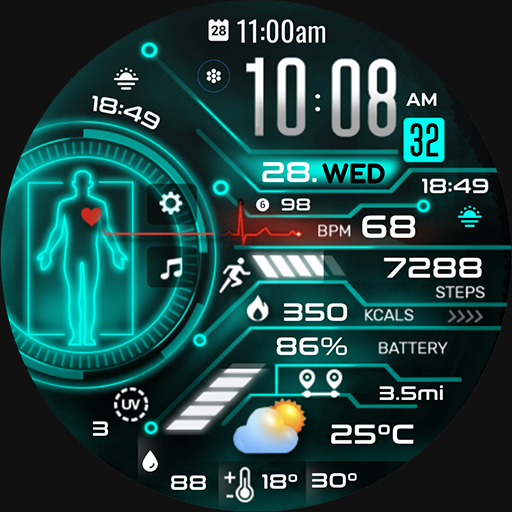
PRADO 34 Digital Watch Face
Personalization
4.5
875 ダウンロード
"Dashboard - Fitness - Sporty - Futuristic - Wear OS"
Google Playでインストール
有料アプリ


このアプリについて
Telegram Channel
https://t.me/pradodesign
Only for Wear OS devices
ATTENTION
If you see the message "Your devices are not compatible", go to the Play Store in your browser.
BUY 1 GET 1
https://pradodesignbr.com/BOGO
Features:
1. 12h/24h based on your phone settings
2. Heart Rate
3. Battery Level
4. Date / Weekday
5. 4 Customizable Fields
6. Changeable background and colors
7. Always On Display
8. Shortcuts
Touch and hold the display to customize your watch face.
For full functionality please manually enable sensors and receive complication data permissions!
SETTING WEATHER COMPLICATION
Press and hold the center of the watch > customize > choose a major complication and choose your weather complication provider.
The weather app needs to have the weather location set before it can set a complication.
We recommend the SimpleWeather app
https://play.google.com/store/apps/details?id=com.thewizrd.simpleweather
HEART RATE
Allow access to heart rate after installing the watch face.
The shortcut does not open the Heart Rate app, but starts the measurement.
Tap the heart icon to start measuring heart rate.
Make sure the watch screen is turned on and that you are wearing it correctly on your wrist when measuring your heart rate.
Newsletter
Sign up to stay updated with new watch faces and promotions!
https://stats.sender.net/forms/bYgPKe/view
Website
https://pradodesignbr.com
Instagram
https://www.instagram.com/pradodesignbr
Facebook
https://www.facebook.com/pradodesignbr
https://t.me/pradodesign
Only for Wear OS devices
ATTENTION
If you see the message "Your devices are not compatible", go to the Play Store in your browser.
BUY 1 GET 1
https://pradodesignbr.com/BOGO
Features:
1. 12h/24h based on your phone settings
2. Heart Rate
3. Battery Level
4. Date / Weekday
5. 4 Customizable Fields
6. Changeable background and colors
7. Always On Display
8. Shortcuts
Touch and hold the display to customize your watch face.
For full functionality please manually enable sensors and receive complication data permissions!
SETTING WEATHER COMPLICATION
Press and hold the center of the watch > customize > choose a major complication and choose your weather complication provider.
The weather app needs to have the weather location set before it can set a complication.
We recommend the SimpleWeather app
https://play.google.com/store/apps/details?id=com.thewizrd.simpleweather
HEART RATE
Allow access to heart rate after installing the watch face.
The shortcut does not open the Heart Rate app, but starts the measurement.
Tap the heart icon to start measuring heart rate.
Make sure the watch screen is turned on and that you are wearing it correctly on your wrist when measuring your heart rate.
Newsletter
Sign up to stay updated with new watch faces and promotions!
https://stats.sender.net/forms/bYgPKe/view
Website
https://pradodesignbr.com
https://www.instagram.com/pradodesignbr
https://www.facebook.com/pradodesignbr
アプリ情報
バージョン
1.0.3
更新日
Sep 24, 2024
サイズ
Android要件
パッケージID
com.watchfacestudio.prado34
インストール数
875
カテゴリ
Personalization
新機能
- Watch face updated to the new "Watch Face Format".
- Bugs fixed.
- Bugs fixed.
アプリの権限
-
Wearable sensors/Activity data
- body sensors (like heart rate monitors)
-
Other
- reorder running apps
- control vibration
- prevent device from sleeping
- Google Play license check


評価とレビュー
4.5
総評価数
5
4
3
2
1
O
Olivia K
Jun 01, 2024
Awesome watch face.
K
Kelli-Ann McLean
Jan 27, 2024
The app doesn't look like what was advertised. It's totally different, very disappointed and it wasn't free.