

Realistic Info - Watch Face
Personalization




이 앱 정보
[ Only for Wear OS devices - API 33+ ]
🌦️ Feel the sky with every weather forecast!
FEATURES
● 🎨 10 x 20 colours variants
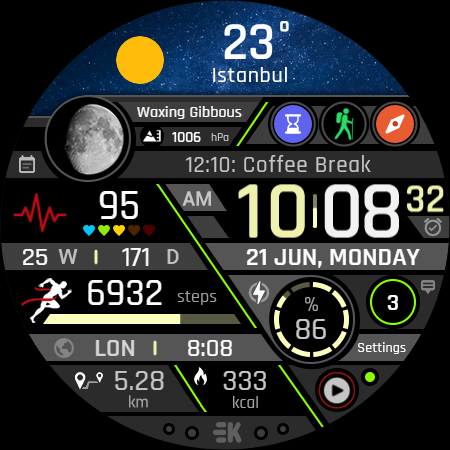
● 🌕 Live moon phases with description
● 🕒 12/24 H (Based on your phone time setting)
● 🚧 Km/Mil supported (Automatically selected based on phone language (in United States and United Kingdom))
● 📊 Steps - Calories - Battery - Next Event - Heart rate (On wrist) - Calendar - 2 custom complications - 6 shortcuts - Days in year - Week in year - Dual time - Unread notification count
● 👀 Always on display supported
● ⚡ Charging animation
📌 INSTALLATION NOTES:
1 - 🔗 Ensure your watch is properly connected to your phone. Open the Phone App on your phone and tap on "DOWNLOAD TO THE WATCH", then follow the instructions on your watch.
⌛ A few minutes after tapping the install button on your watch, the watch face will be installed. You can then select your new watch face!
📱 The phone app serves as a placeholder to make it easier to install and find the watch face on your Wear OS device.
⚠️ Note: If you find yourself stuck in a payment loop, don’t worry! You will only be charged once, even if prompted to pay again. Wait 5 minutes or restart your watch and try again. This could be a synchronization issue between your device and Google servers.
2 - 💻 Alternatively, you can try installing the watch face from a web browser on your PC.
⚠️ Please note that any issues on this side are NOT developer-dependent. The developer has no control over the Play Store from this side. Thank you.
🔑 For full functionality, please manually enable Sensors & receive complication data permissions!
WEB
https://www.ekwatchfaces.com
https://www.instagram.com/ekwatchfaces
https://www.facebook.com/ekwatchfaces
https://twitter.com/ekwatchfaces
https://www.pinterest.com/ekwatchfaces
YOUTUBE
https://bit.ly/2TowlDE
앱 정보
새로운 기능
앱 권한
-
Other
- pair with Bluetooth devices
- access Bluetooth settings
- control vibration
- Google Play license check

평가 및 리뷰
its a great watch face. never had loading issues or anything.
I really like this watch face, only thing I can't get working in the weather on the top row for pixel watch 2, unless there is something I'm missing. never mind, you edit the watch face on the watch and then you can pick what goes up there.
very informative
just got it today and love the layout and features it provides. great job
I really like this watch face, it has a lot of live data but is nice to look at, good customisable fields let you set it just right and the "Always On" display looks good and show time well. nice work
I really like this watchface as it packs in everything I want to be able to view at a glance. New feature to recommend would be to have the night sky change to a daylight scene during the day. Or possibly even choose other images if it must remain fixed. That would be awesome. Keep up the good work!
유사한 앱

Sharper Clock - Watch Face

Realistic Clock - Watch Face

IA100 Health Digital Watchface

Sci Fi Slate Watch Face

MD293 Digital watch face


