

Analog Health Tracking - RE56
Personalization
3.6
18.3K+ 다운로드
"Wear Os Watch Face - Customizable Data & Styles - Minimal & Informative"
Google Play에서 설치
유료 앱




이 앱 정보
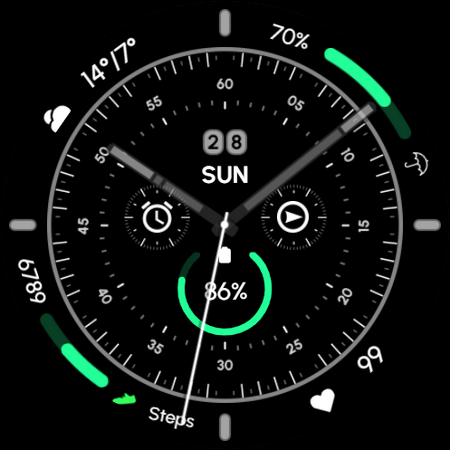
This Wear OS Watch Face is fully customizable, offering multiple color styles, along with various hand and index styles. It's designed to provide users with the flexibility to personalize their smartwatch appearance to match their personal taste or mood.
⌚Powered by Watch Face Format
⚙️ Phone App Features
The phone app is simply a tool to facilitate installation and locating the watch face on your Wear OS watch. Only the mobile app contains ads.
⚙️ Watch Face Features
• 12/24h Digital Time
• Date
• Battery
• Steps Count
• 2 customizable Shortcut
• 5 customizable Complications
• 6x Hand Styles
• 9x Index Colors
• 3x Index Indicators Colors
• Multiple Color Styles
• Color Variations
• Always ON Display
🎨 Customization
1 - Touch and hold display
2 - Tap on Customize option
🎨 Complications
Touch and hold display to open customization mode. You can customize the field with any data you want.
🔋 Battery
For better battery performance of the watch, we recommend disabling the "Always On Display" mode.
✅ Compatible devices include API level 33+ Google Pixel, Galaxy Watch 4, 5, 6, 7 and other Wear OS models.
Installation and troubleshooting
Follow this link: https://www.recreative-watch.com/help/#installation-methodes
Watch faces don't automatically apply on your watch screen after the installation. That's why you must set it on your watch's screen.
💌 Write to [email protected] for assistance.
⌚Powered by Watch Face Format
⚙️ Phone App Features
The phone app is simply a tool to facilitate installation and locating the watch face on your Wear OS watch. Only the mobile app contains ads.
⚙️ Watch Face Features
• 12/24h Digital Time
• Date
• Battery
• Steps Count
• 2 customizable Shortcut
• 5 customizable Complications
• 6x Hand Styles
• 9x Index Colors
• 3x Index Indicators Colors
• Multiple Color Styles
• Color Variations
• Always ON Display
🎨 Customization
1 - Touch and hold display
2 - Tap on Customize option
🎨 Complications
Touch and hold display to open customization mode. You can customize the field with any data you want.
🔋 Battery
For better battery performance of the watch, we recommend disabling the "Always On Display" mode.
✅ Compatible devices include API level 33+ Google Pixel, Galaxy Watch 4, 5, 6, 7 and other Wear OS models.
Installation and troubleshooting
Follow this link: https://www.recreative-watch.com/help/#installation-methodes
Watch faces don't automatically apply on your watch screen after the installation. That's why you must set it on your watch's screen.
💌 Write to [email protected] for assistance.
앱 정보
버전
업데이트 날짜
Aug 25, 2025
크기
Android 요구 사항
패키지 ID
com.recreative.recreative56
설치 수
18.3K+
카테고리
Personalization
앱 권한
-
Other
- receive data from Internet
- view network connections
- full network access
- prevent device from sleeping

평가 및 리뷰
3.6
총 평가
5
4
3
2
1
B
Brian Grant
Mar 18, 2025
Trash
I
Indra Darmawan
Dec 17, 2024
Not able to refund, i have try all the way, but not possible Menu can not edit properly, limit of item
A
Adrian Varnado
Jul 20, 2024
Absolutely horrible. Kept crashing, refused to load at times.
D
Deepak Kadam S
Jul 20, 2024
Good
M
Matt Friend
Jul 15, 2024
Won't install......
M
Marissa Shaffer
Jul 14, 2024
Disappointed- I bought the app and customized my watch face I wanted but the always on display must be a preset so it changes all my settings


