

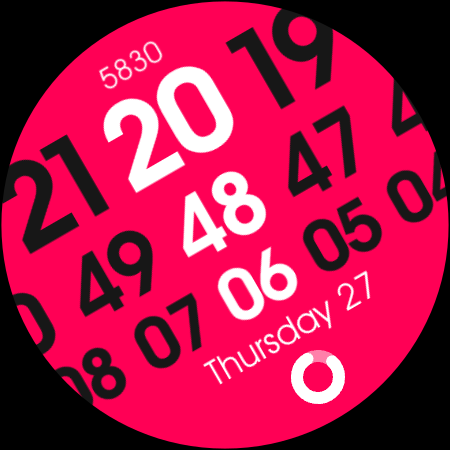
UsA Sequence Zero - USA161
Personalization
0.0
290 다운로드
"Unique sequence number watch face for WearOS"
Google Play에서 설치
유료 앱




이 앱 정보
A unique watch face with sequence number style for Wear OS with customizable styles and complications.
This watch face requires Wear OS API 33+ (Wear OS 4 or newer). Compatible with Galaxy Watch 4/5/6/7/8 Series and newer, Pixel Watch series and other watch face with Wear OS 4 or newer.
Make sure you are purchasing using the same Google account registered on your watch. The installation should begin automatically on the watch after a few moments.
Features :
- Standout unique digital sequence design
- 12/24 hour digital sync with your phone settings
- Multi-color combination to choose
- 1 custom information and 2 app shortcuts
After the installation is completed on your watch, do these steps to open the watch face on your watch :
1. Open the watch face list on your watch (tap and hold the current watch face)
2. Scroll to the right and tap "add watch face"
3. Scroll down and find new installed watch face in the "downloaded" section
For WearOS 5 or newer, you can also simply tap "set/install" on the companion app, then tap set on the watch.
Tap and hold the watch face and go to the "customize" menu (or settings icon under the watch face) to change the styles and also manage the custom complication.
To change between 12 or 24-hour mode, go to your phone date and time settings and there is an option to use 24-hour mode or 12-hour mode. The watch will sync with your new settings after a few moments.
Join our Telegram group for live support and discussion
https://t.me/usadesignwatchface
This watch face requires Wear OS API 33+ (Wear OS 4 or newer). Compatible with Galaxy Watch 4/5/6/7/8 Series and newer, Pixel Watch series and other watch face with Wear OS 4 or newer.
Make sure you are purchasing using the same Google account registered on your watch. The installation should begin automatically on the watch after a few moments.
Features :
- Standout unique digital sequence design
- 12/24 hour digital sync with your phone settings
- Multi-color combination to choose
- 1 custom information and 2 app shortcuts
After the installation is completed on your watch, do these steps to open the watch face on your watch :
1. Open the watch face list on your watch (tap and hold the current watch face)
2. Scroll to the right and tap "add watch face"
3. Scroll down and find new installed watch face in the "downloaded" section
For WearOS 5 or newer, you can also simply tap "set/install" on the companion app, then tap set on the watch.
Tap and hold the watch face and go to the "customize" menu (or settings icon under the watch face) to change the styles and also manage the custom complication.
To change between 12 or 24-hour mode, go to your phone date and time settings and there is an option to use 24-hour mode or 12-hour mode. The watch will sync with your new settings after a few moments.
Join our Telegram group for live support and discussion
https://t.me/usadesignwatchface
앱 정보
평가 및 리뷰
0.0
총 평가
5
4
3
2
1
T
Tammi Tatum
Dec 22, 2025
I love this one and all the choices of colors!
M
Mav W.D
Nov 07, 2025
Beautiful and lovely 👌🔥
R
Rot Rose
Nov 07, 2025
thanks for another amazing watch face, the colors are stunning and the design is elegant
S
Satya
Nov 07, 2025
USA has done it again! wonderful
유사한 앱

Pixel Sporty Pro - Watch face
SP Watches
0.0

Pop Time - Watch face
SP Watches
0.0

Pixel Pro Digital - Watch face
SP Watches
0.0

CC Digital 25 Watch Face
Cave Club
0.0
Big Giraffe Watch Face
zolawatchfaces
0.0

Digital Watch MB429
MikichBlaz
0.0
개발자의 다른 앱

UsA Premium Neo - USA194
USA Design Watch Face
5.0

UsA Gear X Animated - USA193
USA Design Watch Face
0.0

UsA Butter Three Anim - USA192
USA Design Watch Face
0.0

UsA Butter Two Anim - USA191
USA Design Watch Face
5.0

UsA Doodle 2 Animated - USA190
USA Design Watch Face
4.9

UsA Flip Watch Face - USA189
USA Design Watch Face
4.8