

GoodLuck Relay ZKin Watch
Personalization
0.0
52 다운로드
"The Watch supports running on Wear OS"
Google Play에서 설치
유료 앱



이 앱 정보
The Watch supports running on Wear OS
🎁Coupon Link :
https://www.facesapps.com/brand/327
🎁Add Telegram group to obtain remaining coupons :
https://t.me/zkinwatch
🏠Other my works here:
https://play.google.com/store/apps/dev?id=9082617204511160070
⌚️Instagram :
https://www.instagram.com/zkinwatchfaces?igsh=OHNuOHExbGliYWtm
⌚️Facebook :
https://www.facebook.com/share/1YFxgRMiqf/
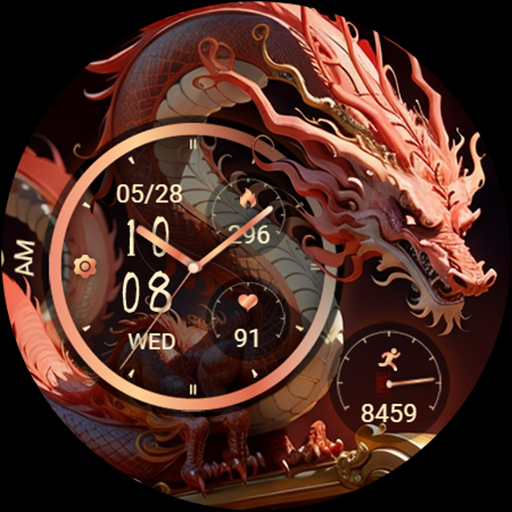
1. On the left: morning and afternoon, settings, date, time, week
2. Middle: Calories, heart rate
3. On the right: Pointer to the number of steps and the target percentage of steps
Compatible with devices: Pixel Watch, Galaxy Watch 4, Galaxy Watch 5, Galaxy Watch 6 and other devices
How do I install the watch face on WearOS ?
1. Install it from Google Play Wear Store on your watch
2. Install the companion app for fully customization (Android phone devices)
If your device prompts "Please check your watch", the solution is as follows:
Method 1: Install on the watch end: Long press the watch to switch dial status/slide to the far right to add a dial/slide to the far bottom to find the purchased dial, click to set it
Method 2: Install on the mobile phone: Open Samsung Smart Wearable/Watch/Slide to the bottom of the downloaded list/Left slide to find the downloaded watch, click on Install to proceed
If heart rate is not displayed, please operate on the watch: Settings/Application/Health Platform/Samsung Health/Health Platform (Start)/Heart Rate (Enable)/Finis
앱 정보
새로운 기능
Update: Support for higher versions
More watch faces: https://zkinwatchfaces.com/
앱 권한
-
Other
- Google Play license check


