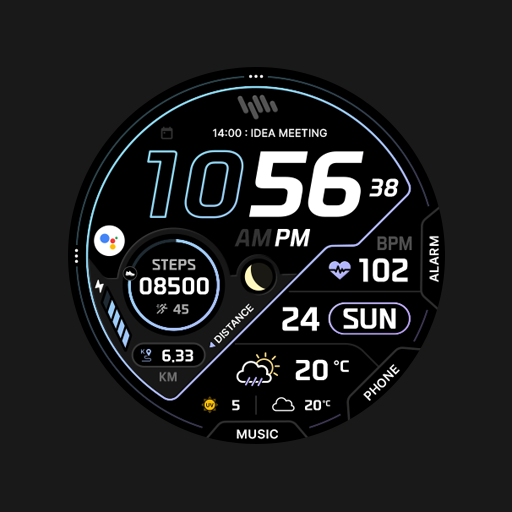
NW Ace Pro Wear OS Watch Face
Personalization
0.0
718 다운로드
"Highly customizable and optimized Wear OS watch face with neon visual design."
Google Play에서 설치
유료 앱


이 앱 정보
FOLLOW US FOR FREE COUPONS AND UPCOMING SALES
https://linktr.ee/neonwavewatch
HOW TO INSTALL
To install this watch face from your phone, please select your smartwatch in Other devices dropdown menu on the main page of this app.
If you have problems, just go to Play Store on your smartwatch and download the watch face manually.
After that make sure you enabled all needed permissions in Settings/Applications/Permissions for this particular watch face app.
FEATURES
★ Multi language
★ 28 Theme Options (10 font colors, 9 icon colors, 9 neutral background patters)
★ 2 custom app shortcuts
★ Over 100+ possible theme combinations
★ Exclusive and handcrafted font
★ Icon ready for weather complication
★ 12H & 24H time modes
★ Simple and battery friendly AOD
★ Highly optimized for battery life
TOUCH CONTROLS
★ Alarm (click on square icon)
★ Calendar (click on date)
★ Battery info (click on battery)
★ Advanced customization (click & hold in the middle, click on customize button)
FEEDBACK & BUG REPORT
NeonWave watch faces are shaped by its users and I'm all ears to hear your ideas. With rating of this watch you can also use the review to share your ideal concept and I'll make it real! If you found any problem with this watch face, please contact me on my support email or social media.
Thank you very much!
https://linktr.ee/neonwavewatch
HOW TO INSTALL
To install this watch face from your phone, please select your smartwatch in Other devices dropdown menu on the main page of this app.
If you have problems, just go to Play Store on your smartwatch and download the watch face manually.
After that make sure you enabled all needed permissions in Settings/Applications/Permissions for this particular watch face app.
FEATURES
★ Multi language
★ 28 Theme Options (10 font colors, 9 icon colors, 9 neutral background patters)
★ 2 custom app shortcuts
★ Over 100+ possible theme combinations
★ Exclusive and handcrafted font
★ Icon ready for weather complication
★ 12H & 24H time modes
★ Simple and battery friendly AOD
★ Highly optimized for battery life
TOUCH CONTROLS
★ Alarm (click on square icon)
★ Calendar (click on date)
★ Battery info (click on battery)
★ Advanced customization (click & hold in the middle, click on customize button)
FEEDBACK & BUG REPORT
NeonWave watch faces are shaped by its users and I'm all ears to hear your ideas. With rating of this watch you can also use the review to share your ideal concept and I'll make it real! If you found any problem with this watch face, please contact me on my support email or social media.
Thank you very much!
앱 정보
새로운 기능
- Updated SDK
평가 및 리뷰
0.0
총 평가
5
4
3
2
1
S
Spezi Machek
Nov 02, 2025
Does not allow customization on Watch 5 unfortunately.