CELEST5584 Hybrid Watch
Personalization


이 앱 정보
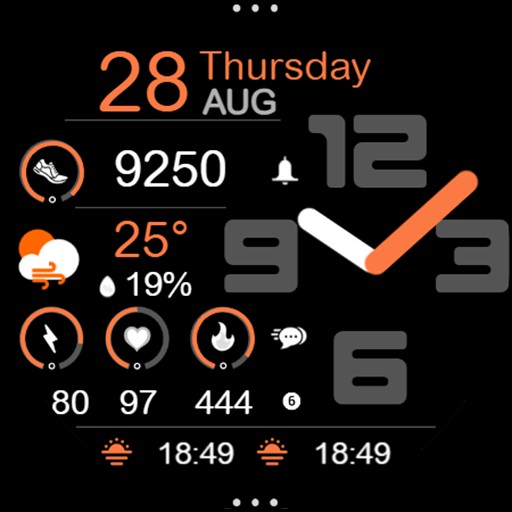
The hands sweep over stacked digits that fill the right side of the dial, with a contrasting seconds hand cutting across them. Down the left, four stats sit in a quiet column behind small icons — heart rate, calories, steps, and battery — sized to stay out of the way of the time. A line complication can be added at the top and bottom, color-matched so it reads as part of the design rather than an addition to it.
⌚ Features
- Analog hour and minute hands over a large digital time
- Contrasting seconds hand
- Heart rate, calories, steps, and battery in a left-hand column
- Optional color-matched line complications top and bottom
- Runs on Wear OS 3 and later
🎨 Customization
- 30 color combinations
- Optional line complications at the top and bottom
- Hide the default left-hand data to open four more line complication slots
ⓘ About Calorie & Distance Stats
A note on stats: When shown directly on the watch face, calorie and distance values are estimated from your steps based on an average user, because Wear OS doesn't provide this data to watch faces from the watch's sensors. Complications are different — they receive real data from the system. Treat the built-in calorie and distance figures as a helpful approximation rather than an exact measurement.
Please note: to use the four left-hand complication slots, hide the default data first. Assigning complications while the default stats are still shown will stack the two on top of each other.
✅ Compatible Devices
- Google Pixel Watch/2/3/4/5
- OnePlus Watch 2/2R/3/4
- Oppo Watch X2/X3
- Samsung Galaxy Watch 4/4 Classic/5/5 Pro/6/6 Classic/7/8/8 Classic/9/FE/Ultra (2024)/(2025)/Ultra 2
- Xiaomi Watch 2/2 Pro/5
🎁 BOGO Promotion: https://celest-watches.com/bogo/
✨ Explore the complete CELEST collection in one place — including all Wear OS, HUAWEI, and Apple Watch faces, along with our apps and tools — with the CELEST Catalog app: https://play.google.com/store/apps/details?id=com.celestwatches.catalog
🔧 Installation Help
Having trouble? We've got you covered:
- Use the dropdown menu next to "Install" on your phone to select your watch model or install directly from your watch's Play Store app.
- Updating weather data (if the watch face shows weather) may take time after installation but switching to another watch face and switching back or restarting both the watch and phone usually helps.
- Check out our installation and troubleshooting guide: https://celest-watches.com/installation-troubleshooting/
- Contact us at [email protected] for quick support
📞 Support & Community
📧 Support: [email protected]
📱 Follow @celestwatches on Instagram and subscribe to our newsletter to get notified of new releases and deals: https://celest-watches.com/newsletter/
앱 정보
새로운 기능
앱 권한
-
Other
- view network connections
- full network access

평가 및 리뷰
I'm very impressed with the simplicity of the face. Occasionally I like to add an extra display and this is truly easy.
Love the clean look and low battery usage. However, There's an issue with changing the complications on the left hand side. changing any of those four slots to anything other than what was originally there just piles on the changed complication onto the original one creating a bit of a jumbled unreadable mess. UPDATE: suggestion from the developer below works to address the issue. Thanks so much for being so responsive! great watchface!
Great looking watch face. Thank you
A new favourite, this watchface offers all the diversity I need. Lovely colour combinations and a plethora of data make it very nice and useful at the same time. Five stars!