

CELEST5646 Gamer Watch
Personalization
0.0
236 다운로드
"Retro pixel-art watch face & 8-bit gamer style. Steps, heart rate & battery."
Google Play에서 설치
유료 앱




이 앱 정보
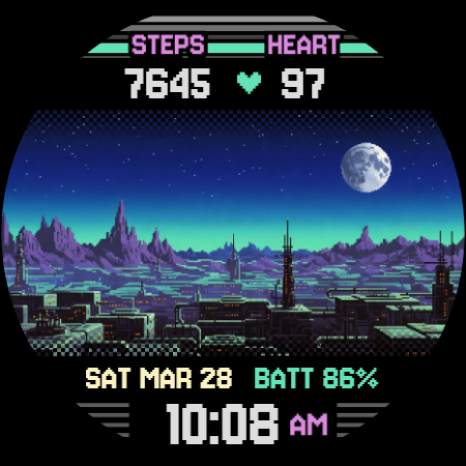
Relive the golden age of 8-bit and 16-bit gaming on your wrist. CELEST 5646 Gamer Watch is a retro watch face built from pixel-perfect landscapes and a classic digital font, a tribute to the era of arcade cabinets and handheld consoles.
Every scene is drawn in vibrant 80s and 90s pixel art, from mystical castles to neon-soaked skylines. A bold pixelated clock anchors the dial while the day and date sit cleanly along the top, and your essential stats stay integrated into the pixel UI, keeping that immersive retro feel without the clutter. CELEST 5646 Gamer Watch focuses on nostalgic style rather than customizable complications.
🎮 Features
- Pixel-perfect 80s and 90s retro art
- Bold pixelated digital clock with day and date
- Steps, heart rate, and battery integrated into the UI
🎨 Customization
- 37 background variations across four themes: Sci-Fi, Fantasy, Big City, and Cyberpunk
- 30 UI color variations, from high-contrast neons to muted vintage tones
- Total control over your retro palette to match your mood
✅ Compatible Devices
- Google Pixel Watch/2/3/4
- OnePlus Watch 2/2R/3
- Oppo Watch X/X2
- Samsung Galaxy Watch 4/4 Classic/5/5 Pro/6/6 Classic/7/8/8 Classic/FE/Ultra (2024/2025)
- Xiaomi Watch 2/2 Pro/5
🎁 BOGO Promotion: https://celest-watches.com/bogo/
✨ Explore the complete CELEST collection in one place — including all Wear OS, HUAWEI, and Apple Watch faces, along with our apps and tools — with the CELEST Catalog app: https://play.google.com/store/apps/details?id=com.celestwatches.catalog
🔧 Installation Help
Having trouble? We've got you covered:
- Use the dropdown menu next to "Install" on your phone to select your watch model or install directly from your watch's Play Store app.
- Updating weather data (if the watch face shows weather) may take time after installation but switching to another watch face and switching back or restarting both the watch and phone usually helps.
- Check out our installation and troubleshooting guide: https://celest-watches.com/installation-troubleshooting/
- Contact us at [email protected] for quick support
📞 Support & Community
📧 Support: [email protected]
📱 Follow @celestwatches on Instagram and subscribe to our newsletter to get notified of new releases and deals: https://celest-watches.com/newsletter/
Every scene is drawn in vibrant 80s and 90s pixel art, from mystical castles to neon-soaked skylines. A bold pixelated clock anchors the dial while the day and date sit cleanly along the top, and your essential stats stay integrated into the pixel UI, keeping that immersive retro feel without the clutter. CELEST 5646 Gamer Watch focuses on nostalgic style rather than customizable complications.
🎮 Features
- Pixel-perfect 80s and 90s retro art
- Bold pixelated digital clock with day and date
- Steps, heart rate, and battery integrated into the UI
🎨 Customization
- 37 background variations across four themes: Sci-Fi, Fantasy, Big City, and Cyberpunk
- 30 UI color variations, from high-contrast neons to muted vintage tones
- Total control over your retro palette to match your mood
✅ Compatible Devices
- Google Pixel Watch/2/3/4
- OnePlus Watch 2/2R/3
- Oppo Watch X/X2
- Samsung Galaxy Watch 4/4 Classic/5/5 Pro/6/6 Classic/7/8/8 Classic/FE/Ultra (2024/2025)
- Xiaomi Watch 2/2 Pro/5
🎁 BOGO Promotion: https://celest-watches.com/bogo/
✨ Explore the complete CELEST collection in one place — including all Wear OS, HUAWEI, and Apple Watch faces, along with our apps and tools — with the CELEST Catalog app: https://play.google.com/store/apps/details?id=com.celestwatches.catalog
🔧 Installation Help
Having trouble? We've got you covered:
- Use the dropdown menu next to "Install" on your phone to select your watch model or install directly from your watch's Play Store app.
- Updating weather data (if the watch face shows weather) may take time after installation but switching to another watch face and switching back or restarting both the watch and phone usually helps.
- Check out our installation and troubleshooting guide: https://celest-watches.com/installation-troubleshooting/
- Contact us at [email protected] for quick support
📞 Support & Community
📧 Support: [email protected]
📱 Follow @celestwatches on Instagram and subscribe to our newsletter to get notified of new releases and deals: https://celest-watches.com/newsletter/
앱 정보
새로운 기능
Updated to target Android 16 (API 36).
앱 권한
-
Other
- view network connections
- full network access
- Google Play license check

평가 및 리뷰
0.0
총 평가
5
4
3
2
1
C
C. S.
Jul 13, 2026
lots of choices, thanks!
L
Luke
Mar 13, 2026
Really cool! So many backgrounds are available!
B
Brendon Hall
Mar 08, 2026
I was interested when I saw pixel art. I was hooked when I saw cyberpunk scifi themes. Great and creative watchface. this one has the all my favortite themes covered. if your a reader or a gamer this is the one. very cool!!


