

Active Wear Watchface 2
Personalization

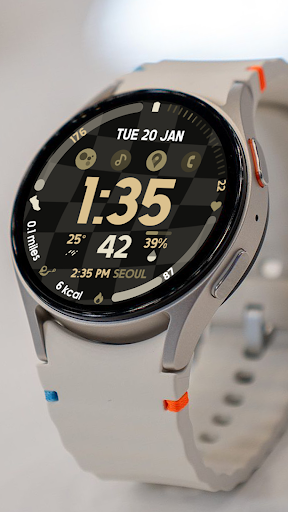


About this app
⭐️Note for Galaxy Watch Users: The watch face editor in the Samsung Wearable app often fails to sync and load complex watch faces.
This is not an issue with the watch face. It is recommended to customize the watch face directly on the watch until Samsung resolves this issue.
📍This watch face supports all Wear OS devices with API Level 34+ | Wear OS 4 and later versions
(Some features may not be available on some watches)
⭐️KEY FEATURES:
- Digital Clock & Date
- 4 Pre-set Complications (FIXED not Customizable)
Battery, Steps Count, Heart Rate, Burned Calories (based on Activity)
- 4 Custom App Shortcuts
- 4 Custom Complications (you can customize the complication with the any data you want.
For example, you can select Date, weather, steps, world clock, sunset/sunrise, next appointment, distance walked and more.
***You may need to install additional third-party complications.
- Custom Color Palette
TAKE NOTE❗️❗️❗️
1️⃣ Watch faces automatically install on WEAR OS watch.
2️⃣ MAKE SURE THE WATCH IS SYNCED TO YOUR PHONE USING THE SAME EMAIL ADDRESS FOR SEAMLESS INSTALLATION.
3️⃣ After download, WAIT for a few minutes for the watch face to be transferred on watch. (There will be a notification on your watch if the watch face was successfully transferred.)
4️⃣ If incase there is no notification, Go to PLAYSTORE ON YOUR WATCH and type on the SEARCH BOX "Active Wear Watchface 2"
⭐️ Watch faces don't automatically display/change after successful installation. Go back to home display. Tap and hold display, swipe until the end and tap + to add the watch face. Rotate Bezel or scroll to find the watch face.
📍ALLOW / ENABLE all permissions from settings -> applications -> permissions.
⚠️⚠️⚠️ Refund is ONLY allowed within 24 hours.
Contact us at: [email protected]
Installation Tutorial: https://www.youtube.com/watch?v=vMM4Q2-rqoM
App Info
App Permissions
-
Wearable sensors/Activity data
- body sensors (like heart rate monitors)
-
Other
- reorder running apps
- control vibration
- prevent device from sleeping
- set an alarm


Ratings and Reviews
can't find" floor count " in combination field , I'm with Samsung Galaxy watch 9
I love this watch face. Nice fonts. Easy to see the digital clock and has 8 complications to put your favorite apps in the main screen. price is cheap too.
like the simple and wstchface design. Love that I can put black as a background. The only thing is that not all complications have all the options, and when I put the stopwatch on one, it shows the text "stopwatch"
I really like this watch face.
Never would download to my watch
Colorful with plenty of ways to customize


