

ApeX WatchFace
Personalization
0.0
172 Downloads
"Modern analog watch face for Wear OS featuring 12 vibrant color schemes."
Install on Google Play
Paid App



About this app
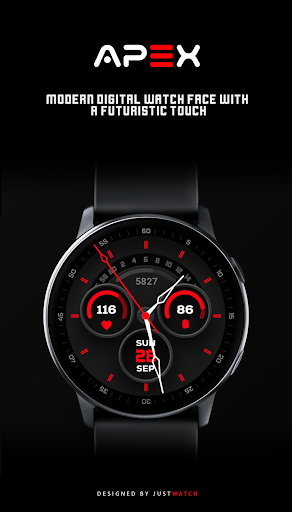
Designed for Wear OS - A sleek and bold analog watch face crafted for style and performance on your smartwatch.
FEATURES:
• Professional Analog Time Display
• Integrated Heart Rate Monitor
• Step Counter Progress
• Battery Percentage Indicator
• Full Date Display (Day, Date, Month)
• Optimized for Galaxy Watch and Pixel Watch
• Advanced Always-On Display (AOD) support
CUSTOMIZATION:
• 12 Different Color Schemes to match your style
• Long-press the watch screen to access customization settings
INSTALLATION:
1. Ensure your watch is connected via Bluetooth.
2. Open the Play Store on your watch or phone.
3. Search for 'ApeX Watchface' and tap install.
4. After installation, find the face in your watch library.
FEATURES:
• Professional Analog Time Display
• Integrated Heart Rate Monitor
• Step Counter Progress
• Battery Percentage Indicator
• Full Date Display (Day, Date, Month)
• Optimized for Galaxy Watch and Pixel Watch
• Advanced Always-On Display (AOD) support
CUSTOMIZATION:
• 12 Different Color Schemes to match your style
• Long-press the watch screen to access customization settings
INSTALLATION:
1. Ensure your watch is connected via Bluetooth.
2. Open the Play Store on your watch or phone.
3. Search for 'ApeX Watchface' and tap install.
4. After installation, find the face in your watch library.
App Info
Version
Updated on
Feb 09, 2026
Size
Requires Android
Package ID
com.justwatch.redline.watchface
Installs
172
Category
Personalization
What's New
1.1
• Initial Release
• Initial Release
App Permissions
-
Wi-Fi connection information
- view Wi-Fi connections
-
Other
- view network connections
- pair with Bluetooth devices
- full network access
- Google Play license check


Ratings and Reviews
0.0
Total ratings
5
4
3
2
1
E
Etienne Willemse
Apr 29, 2026
cool design thank you
R
Rohit Kumar
Mar 28, 2026
Nice 👍
R
Rajat kumar Pattanaik
Mar 24, 2026
lovely
E
Etienne Willemse
Mar 20, 2026
Not a great design. A small child could have done better sorry
G
Global Citizen
Mar 04, 2026
Another great watchface from the dev.. Minimalist designs with neon like colors. Looking beautiful.
M
Mahesh De Andrado
Mar 02, 2026
Absolutely loving this watch face on my Galaxy Watch 4 Classic. Brilliantly done 😍


