

Galaxy Buds Live Manager
Tools
3.4
2M+ Downloads
"This app allows you to use features when connected to a Galaxy Buds Live device."



About this app
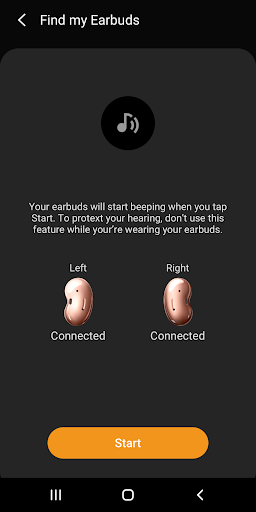
The Galaxy Buds Live Manager allows you to use features such as device settings and status view when connected to a Galaxy Buds Live device.
This application does not work alone because this is a component of the Galaxy Wearable application.
The Galaxy Wearable application has to be installed first for the Galaxy Buds Live Manager application to operate normally.
※ Please allow the permissions of the Galaxy Buds Live Manager in Android Settings to use all the features in Android 6.0 or later.
Settings > Applications > Galaxy Buds Live Manager > Permissions
※ Access permission information
The following permissions are required for the app service. The basic features of the service can be used, even if optional permissions aren't granted.
[Required Permissions]
- Nearby devices : Purpose for confirming to search Buds Devices
[Optional Permissions]
- Phone : Purpose for confirming Contacts information for voice notification function
- Contacts : Purpose for confirming Contacts information for voice notification function
- SMS: Purpose for confirming SMS contents for voice notification
- Calendar : Purpose for checking Calendar information for using voice notification function
- Call logs : Purpose for confirming Call logs information for voice notification function
- Notifications : Purpose for confirming voice notification function
- Files and Media: (Android 12) Used to update earbuds software and save log files
- Storage: (Android 11 or lower) Used to update earbuds software and save log files
If your system software version is lower than Android 6.0, please update the software to configure App permissions.
Previously allowed permissions can be reset on Apps menu in device settings after software update.
App Info
Version
Updated on
Mar 30, 2026
Size
Requires Android
Package ID
com.samsung.accessory.neobeanmgr
Installs
2M+
Category
Tools
What's New
Improved system stability and reliability
App Permissions
-
Device & app history
- retrieve system internal state
- read sensitive log data
-
Identity
- find accounts on the device
-
Calendar
- read calendar events plus confidential information
-
Contacts
- find accounts on the device
- read your contacts
-
SMS
- read your text messages (SMS or MMS)
-
Phone
- read call log
- read phone status and identity
-
Photos/Media/Files
- read the contents of your USB storage
- modify or delete the contents of your USB storage
-
Storage
- read the contents of your USB storage
- modify or delete the contents of your USB storage
-
Wi-Fi connection information
- view Wi-Fi connections
-
Device ID & call information
- read phone status and identity
-
Other
- Access keyguard secure storage
- power device on or off
- interact across users
- manage users
- Audio Routing
- status bar
- modify secure system settings
- receive data from Internet
- view network connections
- pair with Bluetooth devices
- access Bluetooth settings
- change network connectivity
- connect and disconnect from Wi-Fi
- full network access
- close other apps
- change your audio settings
- run at startup
- prevent device from sleeping


Ratings and Reviews
3.4
Total ratings
5
4
3
2
1
A
Anurag Thapa
Nov 10, 2026
app doesn't open
W
Wecent Galaxy A02FF
Nov 01, 2026
I always feel the vibration what people are using it it seems not to be working for me 😞😞😞
Y
Yvonne Dawne Walsh
Oct 26, 2026
get everything you for you're own personal choices
C
Cee Turtle
Sep 22, 2026
ever since the app was taken away these are junk. connect when they want, work when they want.
A
Ashraf Ansari
Aug 08, 2026
good
K
Kaushik Dhali
Aug 08, 2026
not understand
Similar Apps

Samsung Members
Samsung Electronics Co., Ltd.
4.4

Galaxy Wearable
Samsung Electronics Co., Ltd.
3.7

MotorTrend
Hearst Communications, Inc.
4.3

AmpMe - Speaker Booster
AmpMe Inc
3.0

Samsung My Files
Samsung Electronics Co., Ltd.
4.1

SmartThings
Samsung Electronics Co., Ltd.
4.6


