

Samsung Sound
Music & Audio



About this app
Samsung Sound is the official app for setting up and controlling Samsung Wi-Fi speakers and soundbars.
With just a few taps, you can connect your devices, manage your audio, and enjoy sound optimized for your space and content.
■ Easy and quick setup
Automatically discover nearby Samsung Wi-Fi speakers and soundbars and get connected with ease.
From initial setup to Wi-Fi configuration, Samsung Sound is designed to make getting started simple and intuitive.
■ All your audio in one place
View the status of all connected devices and see what’s playing at a glance.
Even when using multiple speakers, you can easily check which audio is playing in each room.
■ Sound control, your way
Customize your listening experience with sound modes, EQ, and other audio settings.
Whether you’re listening to music, watching movies, or enjoying everyday audio, choose the sound that fits your moment.
■ Audio optimized for space and content
Samsung Sound helps optimize audio based on your listening environment and usage scenario.
When watching videos, enjoy clearer, more immersive sound that enhances your viewing experience.
■ A richer, room-filling sound
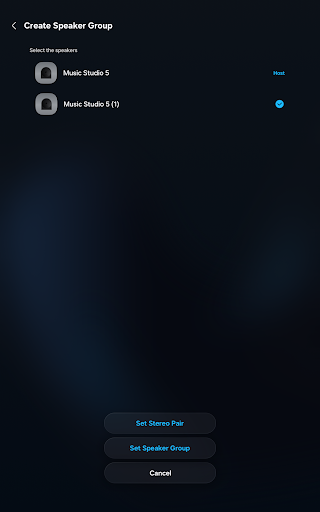
Create a stereo pair or group multiple speakers together to fill your home with rich, powerful sound.
Enjoy seamless audio across rooms and a more immersive music experience throughout your space.
▣ Supported Models (2026.05. update)
▶ 2026 Models
Ready for immediate use right out of the box
[Soundbar]
HW-Q99*H / HW-Q99*GH
HW-Q90*H
HW-Q93*H / HW-Q93*GH
HW-Q8**H / HW-Q8**GH
HW-QS9*H / HW-QS9*GH
HW-Q6**H / HW-Q6**GH
[Music Studio]
HW-LS7*H
HW-LS5*H
▶ 2024 Models
Compatible once the device is updated to the latest firmware.
[Soundbar]
HW-Q99*D / HW-Q99*GD
[Music Frame]
HW-LS6*D / HW-LS6*UD
※ To enjoy the latest features, please keep your Samsung audio devices updated with the latest software.
※ Some features may not be available depending on the product model, region, and software version.
App Info
What's New
App Permissions
-
Location
- approximate location (network-based)
- precise location (GPS and network-based)
-
Camera
- take pictures and videos
-
Microphone
- record audio
-
Wi-Fi connection information
- view Wi-Fi connections
-
Other
- view network connections
- pair with Bluetooth devices
- access Bluetooth settings
- allow Wi-Fi Multicast reception
- connect and disconnect from Wi-Fi
- full network access


Ratings and Reviews
Please add audio information for the currently playing media, such as audio format, channel configuration, and other relevant details.
helpful
I love you Samsung company
where's the sound grouping ?? i always use sound grouping feature which is removed here.
good
Stupid limitation, I have multiple wifi SSIDs for the same network (to force 5ghz for example) and the app requires to be on the same SSID. Also the soundbar does not react if I power on my xbox series x.


