
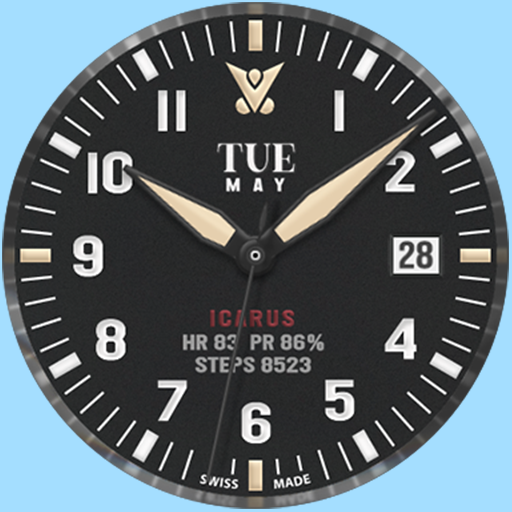
Icarus Watch Face
Personalization
0.0
352 Downloads
"Classic Watch Face Icarus"
Install on Google Play
Paid App


About this app
Simple but elegant classic design Icarus watch face your Wear OS watch with Wear OS version 4 (API 33+) or higher. Examples are Samsung Galaxy Watch 5, 6, 7, 8, Pixel Watch 2, etc. This watch face was designed using Watch Face Studio tool.
✰ Features:
- Analog dial for time, heart rate, steps and battery information
- Customization (dial background, index and dial hands colors)
- Month, day of the week and day display
- 1 preset app shortcut (calendar and/or event)
- 6 custom shortcuts to access your favorite widget
- Always on display lume color and brightness options.
INSTALLATION:
1. Make sure your watch is connected to your smartphone (Bluetooth) with same GOOGLE account.
2. In Play Store App, select your watch as targeted device for installation. The watch face will be installed on your watch.
3. After installation, if your active watch face is not replaced. Follow these 3 SIMPLE STEPS before you comment not working.
3.1- Long press on your current watch face --> swipe to right until --> "Add watch face" (+/plus sign)
3.2- Scroll down and look for "Downloaded" section
3.3- Search and click on your new watch face to activate it - and that's it!
SETTING UP SHORTCUTS/BUTTONS:
1. Press and hold the watch display.
2. Push the customize button.
3. Swipe from right to left until you reach the "complications".
4. The 6 shortcuts are highlighted. Click on it to set what you want.
CUSTOMIZATION OF DIAL STYLE e.g. BACKGROUND, INDEX ETC:
1. Press and hold display then hit "Customize".
2. Swipe left and right to choose what to customize.
E.g. Background, Index frame etc.
3. Swipe up and down to choose options available.
For bugs, comments or suggestions, don't hesitate to contact me at ([email protected]).
App Info
Version
1.1.0
Updated on
Sep 18, 2026
Size
Requires Android
Package ID
com.sprakenturn.icaruswatchface
Installs
352
Category
Personalization
What's New
Icarus Watch Face 1.1.0
- Updated companion app
- Fixed companion app issue related to DEX code optimization
App Permissions
-
Other
- Google Play license check

Ratings and Reviews
0.0
Total ratings
5
4
3
2
1
H
Hossein Torkzaban
Nov 17, 2024
Loved the watchface. Nice Developer and high quality design
D
Darhar M.
Jul 24, 2024
Nice looking watch face. Is there any way to slow down the speed of the seconds hand? **You are welcome.


