

UsA Balancia - USA112
Personalization
4.0
3.9K+ Downloads
"Unique digital and analog style design for Wear OS"
Install on Google Play
Paid App


About this app
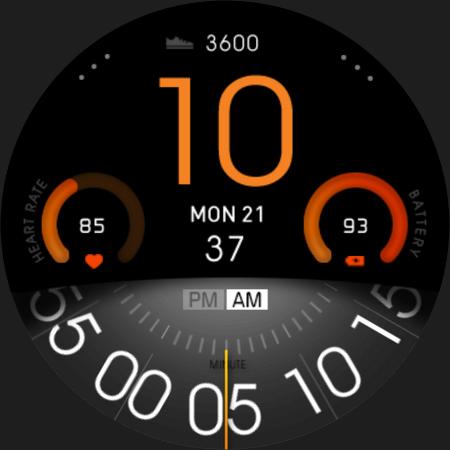
Now available for Wear OS watch, a unique digital and analog combination watch face. Customize the style with an easy menu and make it yours!
This watch face requires Wear OS API 33+ (Wear OS 4 or newer). Compatible with Galaxy Watch 4/5/6/7/8 Series and newer, Pixel Watch series and other watch face with Wear OS 4 or newer.
Make sure you are purchasing using the same Google account registered on your watch. The installation should begin automatically on the watch after a few moments.
After the installation is completed on your watch, do these steps to open the watch face on your watch :
1. Open the watch face list on your watch (tap and hold the current watch face)
2. Scroll to the right and tap "add watch face"
3. Scroll down and find new installed watch face in the "downloaded" section
Features:
- 12/24 hour digital analog style
- Battery Information with gauge
- Heart rate with gauge
- Customize menu for easy styling
- Customize minute blade
- Customize gauge color and hour color
- Custom app shortcuts
- Special Designed AOD, digit color synced with normal mode
Tap and hold the watch face and go to the "customize" menu (or settings icon under the watch face) to change the styles and also manage the custom shortcut complication.
To change between 12 or 24-hour mode, go to your phone date and time settings and there is an option to use 24-hour mode or 12-hour mode. The watch will sync with your new settings after a few moments.
Special designed Always On Display ambient mode. Turn on the Always On Display mode on your watch settings to show a low power display on idle. Please be aware, this feature will use more batteries.
Join our Telegram group for live support and discussion
https://t.me/usadesignwatchface
This watch face requires Wear OS API 33+ (Wear OS 4 or newer). Compatible with Galaxy Watch 4/5/6/7/8 Series and newer, Pixel Watch series and other watch face with Wear OS 4 or newer.
Make sure you are purchasing using the same Google account registered on your watch. The installation should begin automatically on the watch after a few moments.
After the installation is completed on your watch, do these steps to open the watch face on your watch :
1. Open the watch face list on your watch (tap and hold the current watch face)
2. Scroll to the right and tap "add watch face"
3. Scroll down and find new installed watch face in the "downloaded" section
Features:
- 12/24 hour digital analog style
- Battery Information with gauge
- Heart rate with gauge
- Customize menu for easy styling
- Customize minute blade
- Customize gauge color and hour color
- Custom app shortcuts
- Special Designed AOD, digit color synced with normal mode
Tap and hold the watch face and go to the "customize" menu (or settings icon under the watch face) to change the styles and also manage the custom shortcut complication.
To change between 12 or 24-hour mode, go to your phone date and time settings and there is an option to use 24-hour mode or 12-hour mode. The watch will sync with your new settings after a few moments.
Special designed Always On Display ambient mode. Turn on the Always On Display mode on your watch settings to show a low power display on idle. Please be aware, this feature will use more batteries.
Join our Telegram group for live support and discussion
https://t.me/usadesignwatchface
App Info
Version
Updated on
Oct 29, 2025
Size
Requires Android
Package ID
com.usadesign.usabalancia
Installs
3.9K+
Category
Personalization
What's New
Add support for WearOS 5 (GW7 series and Pixel Watch 3 or newer)
Ratings and Reviews
4.0
Total ratings
5
4
3
2
1
S
Scott Mariash
Jan 11, 2026
Way to go
R
Ryan Cheng
Mar 08, 2025
absolutely great! Love this vintage style! Good job!!
t
terry peace
Oct 31, 2024
Great looking watch face. And works on the pixel 3 watch.
A
Andy Swindell
Nov 18, 2023
Always crisp, functional and attractive watch faces, this one is especially clear and shows just the vital information you need!
R
Ron Bid
Jul 30, 2023
Very cool. I appreciate your work.
T
Timothy Eichman
Apr 02, 2023
Lovely watch--heart rate monitor doesn't work on Galaxy Watch 5 Pro.
Similar Apps

Color Ribbon Watch Face
Time Design LLC
0.0

Digital Watch Face MB399
MikichBlaz
0.0
TrackMate Watch Face
amoledwatchfaces™
4.6

Dominant Minute Watch Face
BarefootDials
0.0

META
p10trm
4.7

Digital Bogim Watch face
CERBER WATCH FACE
0.0
More by Developer

UsA Gear X Animated - USA193
USA Design Watch Face
0.0

UsA Butter Three Anim - USA192
USA Design Watch Face
0.0

UsA Butter Two Anim - USA191
USA Design Watch Face
5.0

UsA Doodle 2 Animated - USA190
USA Design Watch Face
4.9

UsA Flip Watch Face - USA189
USA Design Watch Face
4.8

UsA Doodle Animated - USA188
USA Design Watch Face
4.7