

UsA Classic Analog - USA132
Personalization




About this app
This watch face requires Wear OS API 33+ (Wear OS 4 or newer). Compatible with Galaxy Watch 4/5/6/7/8 Series and newer, Pixel Watch series and other watch face with Wear OS 4 or newer.
Make sure you are purchasing using the same Google account registered on your watch. The installation should begin automatically on the watch after a few moments.
After the installation is completed on your watch, do these steps to open the watch face on your watch :
1. Open the watch face list on your watch (tap and hold the current watch face)
2. Scroll to the right and tap "add watch face"
3. Scroll down and find new installed watch face in the "downloaded" section
For WearOS 5 or newer, you can also simply tap "set/install" on the companion app, then tap set on the watch.
Features:
- Analog with 12/24 hour mode digital
- 2 Complication Info (You can set it as weather, battery, steps, etc)
- 100 Index combination style
- 10 hands options
- 2 custom app shortcuts with icon
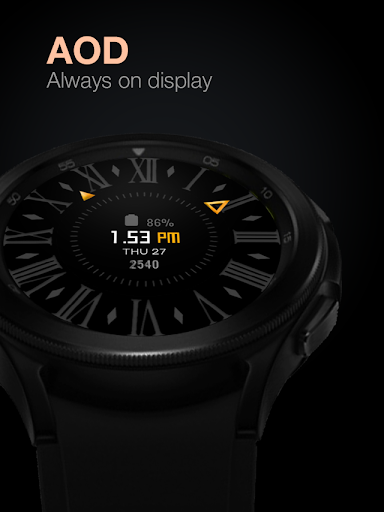
- Special Designed always on display (AOD)
Data shown on the complication area may differ depend on the device and version.
Tap and hold the watch face and go to the "customize" menu (or settings icon under the watch face) to change the styles and also manage the custom shortcut complication.
To change between 12 or 24-hour mode, go to your phone date and time settings and there is an option to use 24-hour mode or 12-hour mode. The watch will sync with your new settings after a few moments.
Special designed Always On Display ambient mode. Turn on the Always On Display mode on your watch settings to show a low-power display on idle. Please be aware, this feature will use more batteries.
Join our Telegram group for live support and discussion
https://t.me/usadesignwatchface
App Info
What's New
Ratings and Reviews
This is by far my favorite watch face. The blue option on the outside dial, with a little gold as accent, makes... it...POP! 🎉
Beautiful watchface but geez, give more customization options and improve AOD mode! Make it so that if the watchface is set to orange and it goes into AOD mode, the brightness will be lowered but the watchface will still look orange (but dimmed). Just like a real watch would behave. Currently all your watchfaces turn black in AOD mode. This is ugly and not realistic. UPDATE Sept 2024: Dev never replied and has not improved AOD mode. I guess he doesn't care what paying customers think.
Easy and quick to install. Very nice dark themed watch face.👍
Good, but... heart rate doesn't show up. Literally just says Heart Rate. Other than that, nice looking watch face. Would give 5 stars if heart rate worked. Yes I allowed access.
Would not install
Did not work. Don't waste you're time or money. Watch5pro
Similar Apps

Omnibus for Wear OS

Rose Gold Turntable ZKin Watch

Minimal Watch face F7

Analogue Watch Face CRC082

Hybrid PUNKET Watch face

MFT WATCHFACE
More by Developer

UsA Gear X Animated - USA193

UsA Butter Three Anim - USA192

UsA Butter Two Anim - USA191

UsA Doodle 2 Animated - USA190

UsA Flip Watch Face - USA189
