

Gradient Light Lines Wear OS
Personalization
0.0
17 Downloads
"These watch faces run on Wear OS"
Install on Google Play
Paid App




About this app
Gradient Light Lines Wear OS
These watch faces run on Wear OS
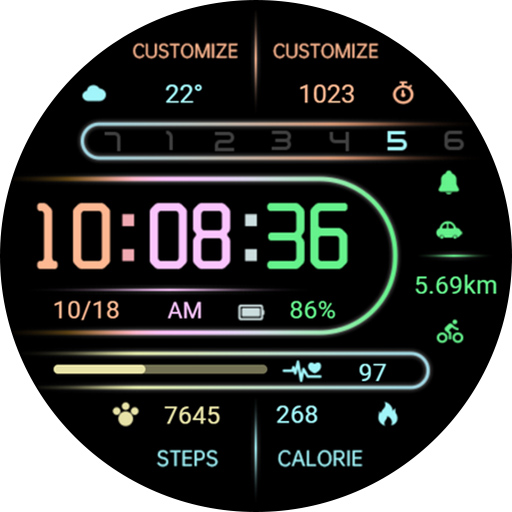
1. Top: Custom Data, Week
2. Central: Custom APP, time, distance, date, morning and afternoon, battery level, custom APP
3. Bottom: Heart rate, heart rate percentage progress, steps, calories
Customization: Multiple customization areas are available for selection
Compatible devices: Pixel Watch, Galaxy Watch 4/5/6/7 and above, and other devices
How do I install the watch face on WearOS ?
1. Install it from Google Play Wear Store on your watch
2. Install the companion app for fully customization (Android phone devices)
These watch faces run on Wear OS
1. Top: Custom Data, Week
2. Central: Custom APP, time, distance, date, morning and afternoon, battery level, custom APP
3. Bottom: Heart rate, heart rate percentage progress, steps, calories
Customization: Multiple customization areas are available for selection
Compatible devices: Pixel Watch, Galaxy Watch 4/5/6/7 and above, and other devices
How do I install the watch face on WearOS ?
1. Install it from Google Play Wear Store on your watch
2. Install the companion app for fully customization (Android phone devices)
App Info
Version
Updated on
Oct 20, 2026
Size
Requires Android
Package ID
com.watchfacestudio.GradientLightLines
Installs
17
Category
Personalization
What's New
Update: Support for higher versions
More watch faces: https://zkinwatchfaces.com/
More watch faces: https://zkinwatchfaces.com/
App Permissions
-
Other
- Google Play license check


