

CELEST5456 Diver Watch
Personalization
0.0
631 Downloads
"Diver watch face with lume markers, day-date window & 10 dial variations."
Install on Google Play
Paid App



About this app
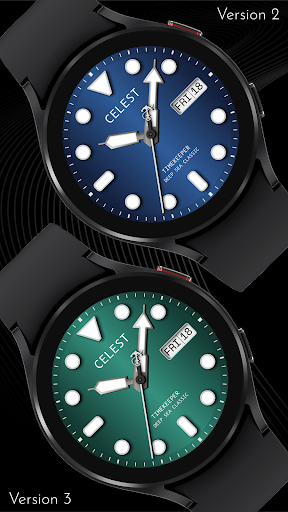
Analog diver: CELEST5456 Diver Watch follows the dive watch conventions that have barely changed in seventy years — large round lume plots at the hours, a triangle at twelve, and broad hands you can read in poor light.
The dial stays clean underneath all that, with a weekday and date window at three o'clock as the only addition. The seconds hand carries a small anchor at its tail, a detail worth noticing, and if you would rather not have it there is a plain version of the hand in the settings. Ten dial variations cover the range.
⚓ Features
- Analog dive dial with round lume markers
- Triangle marker at twelve
- Broad, high-legibility hands
- Combined weekday and date window at 3 o'clock
- Anchor-tipped seconds hand
🎨 Customization
- 10 background variations
- Plain seconds hand option without the anchor
✅ Compatible Devices
- Google Pixel Watch/2/3/4/5
- OnePlus Watch 2/2R/3/4
- Oppo Watch X2/X3
- Samsung Galaxy Watch 4/4 Classic/5/5 Pro/6/6 Classic/7/8/8 Classic/9/FE/Ultra (2024)/(2025)/Ultra 2
- Xiaomi Watch 2/2 Pro/5
🎁 BOGO Promotion: https://celest-watches.com/bogo/
✨ Explore the complete CELEST collection in one place — including all Wear OS, HUAWEI, and Apple Watch faces, along with our apps and tools — with the CELEST Catalog app: https://play.google.com/store/apps/details?id=com.celestwatches.catalog
🔧 Installation Help
Having trouble? We've got you covered:
- Use the dropdown menu next to "Install" on your phone to select your watch model or install directly from your watch's Play Store app.
- Updating weather data (if the watch face shows weather) may take time after installation but switching to another watch face and switching back or restarting both the watch and phone usually helps.
- Check out our installation and troubleshooting guide: https://celest-watches.com/installation-troubleshooting/
- Contact us at [email protected] for quick support
📞 Support & Community
📧 Support: [email protected]
📱 Follow @celestwatches on Instagram and subscribe to our newsletter to get notified of new releases and deals: https://celest-watches.com/newsletter/
The dial stays clean underneath all that, with a weekday and date window at three o'clock as the only addition. The seconds hand carries a small anchor at its tail, a detail worth noticing, and if you would rather not have it there is a plain version of the hand in the settings. Ten dial variations cover the range.
⚓ Features
- Analog dive dial with round lume markers
- Triangle marker at twelve
- Broad, high-legibility hands
- Combined weekday and date window at 3 o'clock
- Anchor-tipped seconds hand
🎨 Customization
- 10 background variations
- Plain seconds hand option without the anchor
✅ Compatible Devices
- Google Pixel Watch/2/3/4/5
- OnePlus Watch 2/2R/3/4
- Oppo Watch X2/X3
- Samsung Galaxy Watch 4/4 Classic/5/5 Pro/6/6 Classic/7/8/8 Classic/9/FE/Ultra (2024)/(2025)/Ultra 2
- Xiaomi Watch 2/2 Pro/5
🎁 BOGO Promotion: https://celest-watches.com/bogo/
✨ Explore the complete CELEST collection in one place — including all Wear OS, HUAWEI, and Apple Watch faces, along with our apps and tools — with the CELEST Catalog app: https://play.google.com/store/apps/details?id=com.celestwatches.catalog
🔧 Installation Help
Having trouble? We've got you covered:
- Use the dropdown menu next to "Install" on your phone to select your watch model or install directly from your watch's Play Store app.
- Updating weather data (if the watch face shows weather) may take time after installation but switching to another watch face and switching back or restarting both the watch and phone usually helps.
- Check out our installation and troubleshooting guide: https://celest-watches.com/installation-troubleshooting/
- Contact us at [email protected] for quick support
📞 Support & Community
📧 Support: [email protected]
📱 Follow @celestwatches on Instagram and subscribe to our newsletter to get notified of new releases and deals: https://celest-watches.com/newsletter/
App Info
Version
Updated on
Aug 05, 2026
Size
Requires Android
Package ID
com.watchfacestudio.celest5456
Installs
631
Category
Personalization
What's New
Updated to target Android 16 (API 36).
App Permissions
-
Other
- view network connections
- full network access

Ratings and Reviews
0.0
Total ratings
5
4
3
2
1
J
Joseph Romano
Feb 05, 2025
Beautiful watch face for the Galaxy Ultra. Classic, simple, and has the date!


