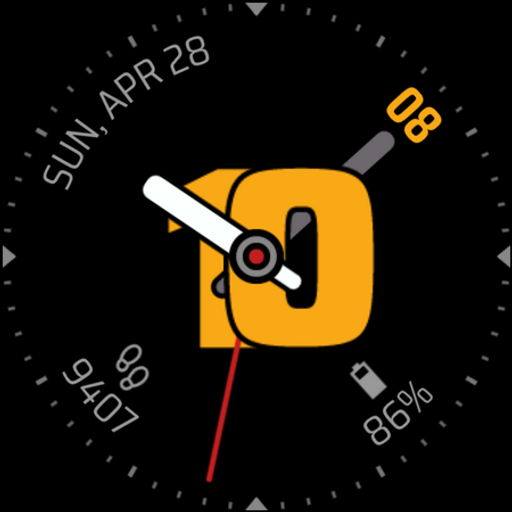
JW378 jwstudio
Personalization
0.0
17 Downloads
"This watch face supports Wear OS devices"
Install on Google Play
Paid App


About this app
JWSTUDIO's watch faces pursue a premium design for Wear OS.
+++++++++++++++++++++++++++++++++++++++++++++++
[How to install]
Before pressing the payment button, make sure your watch is selected.
Select your watch by pressing the small triangle next to the payment button.
Select the menu at the top right of the Play Store app (three dots) > Share > Chrome browser > Install on other devices > Clock and proceed.
After installation, select it from the download list, register it as a favorite, and use it. You can view the download list by clicking 'Add Watch Screen' on the far right of the favorites list that appears when you press the watch screen.
+++++++++++++++++++++++++++++++++++++++++++++++
[Features]
- 28 Background Colors
- 5 Index Style
- 3 Bezel Style
- 5 Hands Style
- Weather Information
- Full AOD color
- Digital Time On/Off
[function]
- 2 preset app shortcut
- 2 customizable shortcut keys
- 5 customizable fields/information display
+++++++++++++++++++++++++++++++++++++++++++++++
[Custom]
1 - Touch and hold the display.
2 - Tap on Custom Options
For inquiries, please contact the email below.
[email protected]
App Info
Version
Updated on
N/A
Size
Requires Android
Package ID
com.watchfacestudio.jwstudio_a_378
Installs
17
Category
Personalization
Ratings and Reviews
0.0
Total ratings
5
4
3
2
1
C
Christopher Low
Oct 08, 2026
Is it possible to create an attractive, minimalist face with lots of adjustable complications, shortcuts & design options ? Strange but yes it is....... This is the proof.