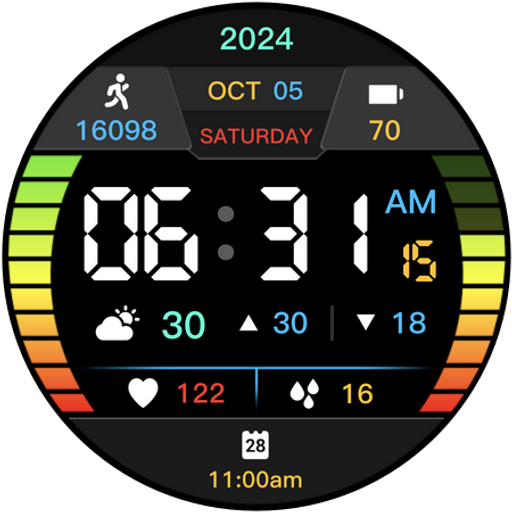
LCD Dark MOD informer
Personalization


About this app
Basic moments:
- A high resolution;
- Large digital time font
- Digital time in 12\24 hour format.
- Changeable colors
- Custom complications
- Display the number of the day of the year
- Display the week number of the year
- AOD mode
Compatible with Wear OS devices running API level 30 and above, including Samsung Galaxy Watch 4, 5, 6, 7, 8 and Pixel Watch.
**Installation**
1. Install the watch face app on your phone.
2. Make sure your Wear OS watch is connected to your phone and uses the same Google account.
3. Select your watch as the installation device and complete the installation.
4. After installation, select the watch face from your watch face gallery.
If installation is delayed, check the internet connection on both devices, wait a minute or two, or restart your watch and try again.
**Customization**
• Touch and hold the watch face, then tap **Customize** to access the available settings.
• For the best experience, we recommend configuring the watch face directly on your watch. Video guide:
https://youtu.be/YPcpvbxABiA
**Support**
If you have any questions or installation issues, please contact: [email protected]
**More watch faces by WIN**
Explore other watch faces:
https://play.google.com/store/apps/dev?id=6789054753742990227
App Info
What's New
- Added the ability to select rain probability in custom complications
- New Watch Face format
App Permissions
-
Other
- full network access

Ratings and Reviews
great watch face and easy to read
Really great watchface. Thanks
The fundamental components of any watch face are date and time, and the date is still not showing UK format despite the misleading picture posted by the developer. It's a shame that despite numerous emails this has still not been corrected.
Nice big numbers. Good amount of complications and shortcuts. Just needs an AOD mode.
awesome watchface
I have installed and reinstalled this on my watch twice. It shows as installed, bit never showed up in the watch list (yes I hit the + sign). I have other watches from them so I'm not sure what is going on. Ticwatch Pro 3 GPS with wearos 3