

PRADO 61 Digital Watch Face
Personalization
5.0
2.5K+ Downloads
"Watch Face powered for Wear OS by PRADO DESIGN"
Install on Google Play
Paid App




About this app
Telegram Channel
https://t.me/pradodesign
Only for Wear OS devices
ATTENTION
If you see the message "Your devices are not compatible", go to the Play Store in your browser.
BUY 1 GET 1
https://pradodesignbr.com/BOGO
Features:
1. 12h/24h based on your phone settings
2. Date
3. Heart Rate
4. Battery Level
5. 6 Customizable Fields
6. Changeable background and colors
7. Always On Display
8. Shortcuts
For full functionality please manually enable sensors and receive complication data permissions!
SETTING WEATHER COMPLICATION
The weather app needs to have the weather location set before it can set a complication.
We recommend the SimpleWeather app
https://play.google.com/store/apps/details?id=com.thewizrd.simpleweather
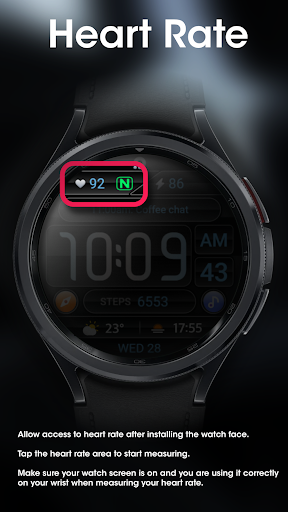
HEART RATE
Allow access to heart rate after installing the watch face.
The shortcut does not open the Heart Rate app, but starts the measurement.
Tap the heart icon to start measuring heart rate.
Make sure the watch screen is turned on and that you are wearing it correctly on your wrist when measuring your heart rate.
Newsletter
Sign up to stay updated with new watch faces and promotions!
https://stats.sender.net/forms/bYgPKe/view
Website
https://pradodesignbr.com
Instagram
https://www.instagram.com/pradodesignbr
Facebook
https://www.facebook.com/pradodesignbr
https://t.me/pradodesign
Only for Wear OS devices
ATTENTION
If you see the message "Your devices are not compatible", go to the Play Store in your browser.
BUY 1 GET 1
https://pradodesignbr.com/BOGO
Features:
1. 12h/24h based on your phone settings
2. Date
3. Heart Rate
4. Battery Level
5. 6 Customizable Fields
6. Changeable background and colors
7. Always On Display
8. Shortcuts
For full functionality please manually enable sensors and receive complication data permissions!
SETTING WEATHER COMPLICATION
The weather app needs to have the weather location set before it can set a complication.
We recommend the SimpleWeather app
https://play.google.com/store/apps/details?id=com.thewizrd.simpleweather
HEART RATE
Allow access to heart rate after installing the watch face.
The shortcut does not open the Heart Rate app, but starts the measurement.
Tap the heart icon to start measuring heart rate.
Make sure the watch screen is turned on and that you are wearing it correctly on your wrist when measuring your heart rate.
Newsletter
Sign up to stay updated with new watch faces and promotions!
https://stats.sender.net/forms/bYgPKe/view
Website
https://pradodesignbr.com
https://www.instagram.com/pradodesignbr
https://www.facebook.com/pradodesignbr
App Info
Version
1.0.1
Updated on
Oct 21, 2024
Size
Requires Android
Package ID
com.watchfacestudio.prado61
Installs
2.5K+
Category
Personalization
What's New
- Watch face updated to the new "Watch Face Format".
- Bugs fixed.
- Bugs fixed.
App Permissions
-
Wearable sensors/Activity data
- body sensors (like heart rate monitors)
-
Other
- reorder running apps
- control vibration
- prevent device from sleeping
- Google Play license check


Ratings and Reviews
5.0
Total ratings
5
4
3
2
1
W
Wael Nuweihed
Oct 23, 2024
Elegant and informative watch face!
M
Marc Allen
Oct 23, 2024
Sporty look and polished graphics 👍
k
kay passa
Oct 23, 2024
Does everything I need and more. Clear numbers that are easy to read and plenty of complications. For me, this watch face is a winner.
R
Ric Smith
Oct 23, 2024
Very nice indeed.. thanks PRADO
M
Mark Wilke
Aug 22, 2024
Great complication layout and easy to read!
R
Rico Mah Gwo Huei
May 27, 2024
Clean & all the info are aligned neatly in one screen. It is pleasing to the eyes 💯.


