

S4U Ancient Gold Watch Face
Personalization
3.8
16.7K+ Downloads
"Ultra realistic high quality analog watch face for Wear OS."
Install on Google Play
Paid App



About this app
****
⚠️ IMPORTANT: Compatibility
This is a Wear OS Watch Face app and supports only smartwatches running Wear OS 5 or higher (Wear OS API 34+).
Compatible devices include:
- Samsung Galaxy Watch 4, 5, 6, 7, 8 (incl. Ultra and Classic Versions)
- Google Pixel Watch 1–4
- Other Wear OS 5+ smartwatches
If you experience any issues with installation or downloading, even on a compatible smartwatch:
1. Open the companion app provided with your purchase.
2. Follow the steps in the Install/Issues section.
Still need help? Feel free to email me at [email protected] for support.
****
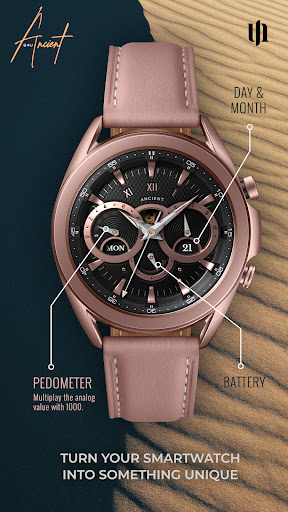
The “S4U Ancient” is a realistic classic analog watch face. Visual exclusivity is the main focus. The extraordinary 3D effect gives you the feeling of wearing a real watch. Take a look at the gallery to get a good impression.
✨ Key Features:
- ultra realistic analog watch face
- versatile color customization
- 7 custom shortcuts to reach your favorite widget
- have an always on display (AOD)
***
🕒 Data Displayed:
Display in the right area:
+ Day of the month
+ month (analog)
Display on the left:
+ Pedometer (each 10.000 steps the analog hand starts at 0)
+ Weekday
Display at the bottom:
+ Battery Status 0-100
***
🎨 CUSTOMIZATION OPTIONS
1. Press and hold the watch display.
2. Push the customize button.
3. Swipe left and right between the different customizable objects.
4. Swipe up or down to change the options of the objects.
Additional functionality:
+ tap the battery hand to open the battery details
****
🌙 Always-On Display (AOD)
The S4U Ancient watch face includes an Always-On Display feature for continuous timekeeping.
Important Notes:
- Using AOD will reduce battery life, depending on your smartwatch's settings.
- Some smartwatches may automatically dim the AOD display based on ambient light conditions.
***
⚙️ SHORTCUTS
Enhance your watch face with customizable app shortcuts:
- App Shortcuts: Link to your favorite widgets for quick access.
How to Set Up Shortcuts:
1. Press and hold the watch display.
2. Tap the customize button.
3. Swipe right to left until you reach the "complications" section.
4. Tap on any of the shortcuts to configure your preferred settings.
****
📬 Stay Connected
If you enjoy this design, be sure to check out my other creations! I’m constantly working on new watch faces for Wear OS. Visit my website to explore more:
🌐 https://www.s4u-watches.com
Feedback & Support
I’d love to hear your thoughts! Whether it’s something you like, dislike, or a suggestion for future designs, your feedback helps me improve.
📧 For direct support, email me at: [email protected]
💬 Leave a review on the Play Store to share your experience!
Follow Me on Social Media
Stay up to date with my latest designs and updates:
📸 Instagram: https://www.instagram.com/matze_styles4you/
👍 Facebook: https://www.facebook.com/styles4you
▶️ YouTube: https://www.youtube.com/c/styles4you-watches
🐦 X: https://x.com/MStyles4you
App Info
Version
Updated on
Oct 02, 2026
Size
Requires Android
Package ID
com.watchfacestudio.s4uancient
Installs
16.7K+
Category
Personalization
What's New
Version (1.1.9) - Companion App
Minor fixes.
App Permissions
-
Other
- view network connections
- full network access
- Google Play license check

Ratings and Reviews
3.8
Total ratings
5
4
3
2
1
J
Jason Cross
Sep 17, 2026
Great
v
volker mario
Jun 23, 2026
excellent
P
Paul S
Mar 23, 2026
I just started using this watch face and I love it- Excellent layout and super classy design! Thanks for your great work on this!
S
Shai Axelrud
Aug 30, 2024
One of the most beautiful faces around. On my white Watch 7 ULTRA, I could make it all wite and it looks absolutely gorgeous!
T
Trent Mitchell
Aug 25, 2024
Nice watch face but customization doesn't work. Keeps timing out and won't load customization screen on phone.
S
Stephen Swenson
Aug 01, 2024
Wrongly installs


