

S4U Phoenix Luxury Watch Face
Personalization



About this app
⚠️ IMPORTANT: Compatibility
This is a Wear OS Watch Face app and supports only smartwatches running Wear OS 4 or higher (Wear OS API 33+).
Compatible devices include:
- Samsung Galaxy Watch 4, 5, 6, 7, 7 Ultra
- Google Pixel Watch 1–3
- Other Wear OS 4+ smartwatches
If you experience any issues with installation or downloading, even on a compatible smartwatch:
1. Open the companion app provided with your purchase.
2. Follow the steps in the Install/Issues section.
Still need help? Feel free to email me at [email protected] for support.
****
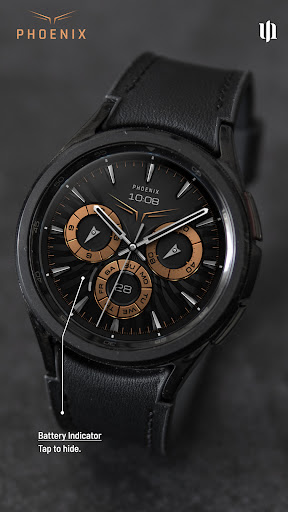
Enhance your Wear OS experience with the S4U Phoenix. A luxury realistic classic analog watch face with 3 editable complication and many editable shortcuts.
✨ Key Features:
- Realistic analog dial
- 3 editable complications (for user-defined data)
- colors customizable
- 4 editable shortcuts (to access your favorite widget)
- AOD
***
🕒 Data Displayed:
analog time, analog steps, analog heart rate, battery (hidden), day of the week, day of the month + 3 editable value
***
🎨 CUSTOMIZATION OPTIONS
1. Press and hold your finger at center on the watch display.
2. Press the button to adjust.
3. Swipe left or right to switch between the different customizable items.
4. Swipe up or down to change the options/color of the items.
Available customization options:
Color: 9
Hands design: 3
Inner dials color: 9
Index color: 9
Small hands: 7
Background Texture: 5
Weekday language: 7 (en, de, sp, po, it, fr, ko)
AOD Layout: 2
AOD Brightness: 3
Complications: 3 editable complications, 4 editable shortcuts
***
🌙 Always-On Display (AOD)
The S4U Phoenix includes an Always-On Display feature for continuous timekeeping. The AOD colors automatically adapt to the design of your standard watch face with a pure black background.
AOD Customization-Optionen:
- 2 AOD layouts
- 3 brightness levels
Important Notes:
Using AOD will reduce battery life, depending on your smartwatch's settings.
Some smartwatches may automatically dim the AOD display based on ambient light conditions.
***
⚙️ COMPLICATIONS & SHORTCUTS
Enhance your watch face with customizable app shortcuts and complications:
- App Shortcuts: Link to your favorite widgets for quick access.
- Editable Complications: Display the data you need most by customizing the visible values.
How to Set Up Shortcuts and Complications:
1. Press and hold the watch display.
2. Push the customize button.
3. Swipe from right to left until you reach the "complications".
4. 4 editable shortcuts and 3 editable complication are highlighted. Click on them to make the desired settings.
***
📬 Stay Connected
If you enjoy this design, be sure to check out my other creations! I’m constantly working on new watch faces for Wear OS. Visit my website to explore more:
🌐 https://www.s4u-watches.com
Feedback & Support
I’d love to hear your thoughts! Whether it’s something you like, dislike, or a suggestion for future designs, your feedback helps me improve.
📧 For direct support, email me at: [email protected]
💬 Leave a review on the Play Store to share your experience!
Follow Me on Social Media
Stay up to date with my latest designs and updates:
📸 Instagram: https://www.instagram.com/matze_styles4you/
👍 Facebook: https://www.facebook.com/styles4you
▶️ YouTube: https://www.youtube.com/c/styles4you-watches
🐦 X: https://x.com/MStyles4you
App Info
What's New
Minor fixes.
App Permissions
-
Other
- view network connections
- full network access
- Google Play license check

Ratings and Reviews
awesome
Facing bugs/issue when I want to customize the watches face, I'm not able to load the customization menu. Please fix it asap
Looks really good. Really want to love it, but you can't customize the complications. You can set what happens when you tap on them, but the only one you can customize the display for is the digital time. Really unfortunate because I really don't care about my heart rate all the time.
Developer put way too much effort into this, new fav.
Good quality for great price
Very luxury 😍😍


