

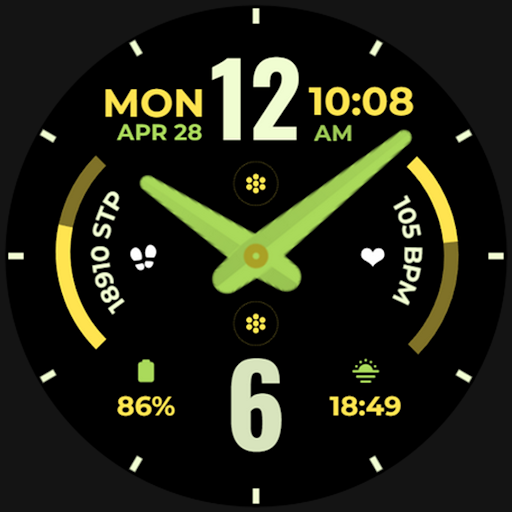
Vivid Time 2 (Analog)
Personalization
0.0
507 Downloads
"Modern, Stylish & Functional Analog Clock for WEAR OS"
Install on Google Play
Paid App




About this app
📍INSTALLATION GUIDE
Our watch face apps are thoroughly tested in a real device (Galaxy Watch 4) and are "reviewed and approved" by the Google Play Store Team before publishing them.
TAKE NOTE❗️❗️❗️
1️⃣ Watchfaces automatically install on watch. (There will be a download icon on screen while installing)
2️⃣ MAKE SURE THE WATCH IS STRONGLY CONNECTED TO YOUR PHONE USING THE SAME WIFI. MUST ALSO LOG IN TO YOUR GOOGLE ACCOUNT "ON WATCH" FOR SEAMLESS INSTALLATION.
3️⃣ After download, WAIT for a few minutes for the watch face to be transferred on watch. (There will be a notification on your watch if the watchface was successfully transferred.)
4️⃣ If incase there is no notification, Go to PLAYSTORE ON YOUR WATCH and type on the SEARCH BOX "Vivid Time 2 (Analog)"
5️⃣ The watchface will show up, then hit on install button.
⭐️ Watchfaces don't automatically change after successful installion. Go back to home display. Tap and hold display, swipe until the end and tap + to add the watchface. Rotate Bezel to find the watchface.
📍Please see Feature Graphics for more details how to install.
⭐️ALLOW / ENABLE all permissions from settings -> applications -> permissions.
⚠️ Refund is ONLY allowed within 48 hours.
📍This watch face was developed with Samsung's "Watch Face Studio" tool for devices based on the new Wear OS Google / One UI Samsung operating system like Samsung Galaxy Watch 4.
📍FEATURES:
-Analog Clock
-Date
-Always-On (AOD)
-Preset App Shortcuts
-Custom App Shortcuts & Complications
-Changeable index styles, watch hands & font color palette
📍Some features may not be available on some watches.
Contact us at: [email protected]
Youtube Installation Tutorial: https://www.youtube.com/watch?v=vMM4Q2-rqoM
Our watch face apps are thoroughly tested in a real device (Galaxy Watch 4) and are "reviewed and approved" by the Google Play Store Team before publishing them.
TAKE NOTE❗️❗️❗️
1️⃣ Watchfaces automatically install on watch. (There will be a download icon on screen while installing)
2️⃣ MAKE SURE THE WATCH IS STRONGLY CONNECTED TO YOUR PHONE USING THE SAME WIFI. MUST ALSO LOG IN TO YOUR GOOGLE ACCOUNT "ON WATCH" FOR SEAMLESS INSTALLATION.
3️⃣ After download, WAIT for a few minutes for the watch face to be transferred on watch. (There will be a notification on your watch if the watchface was successfully transferred.)
4️⃣ If incase there is no notification, Go to PLAYSTORE ON YOUR WATCH and type on the SEARCH BOX "Vivid Time 2 (Analog)"
5️⃣ The watchface will show up, then hit on install button.
⭐️ Watchfaces don't automatically change after successful installion. Go back to home display. Tap and hold display, swipe until the end and tap + to add the watchface. Rotate Bezel to find the watchface.
📍Please see Feature Graphics for more details how to install.
⭐️ALLOW / ENABLE all permissions from settings -> applications -> permissions.
⚠️ Refund is ONLY allowed within 48 hours.
📍This watch face was developed with Samsung's "Watch Face Studio" tool for devices based on the new Wear OS Google / One UI Samsung operating system like Samsung Galaxy Watch 4.
📍FEATURES:
-Analog Clock
-Date
-Always-On (AOD)
-Preset App Shortcuts
-Custom App Shortcuts & Complications
-Changeable index styles, watch hands & font color palette
📍Some features may not be available on some watches.
Contact us at: [email protected]
Youtube Installation Tutorial: https://www.youtube.com/watch?v=vMM4Q2-rqoM
App Info
Version
Updated on
N/A
Size
Requires Android
Package ID
com.watchfacestudio.vividtime2
Installs
507
Category
Personalization
App Permissions
-
Wearable sensors/Activity data
- body sensors (like heart rate monitors)
-
Other
- reorder running apps
- control vibration
- prevent device from sleeping
- set an alarm


Ratings and Reviews
0.0
Total ratings
5
4
3
2
1
J
J David
Jun 09, 2025
This is nothing like the photo. Don't buy anything from Chrono Harvest!


