

Watcholate Watch Faces
Personalization
0.0
9 Downloads
"Browse, unlock and set up Watcholate watch faces on your Wear OS watch."




About this app
Watcholate Watch Faces is the phone app for every Watcholate watch face on Wear OS. Browse the faces and their styles, unlock premium styles with a one-time purchase, set up the faces that need your details, and check that everything is in place on your watch.
The watch faces themselves are separate downloads that you install on your watch from Google Play. This app is where you see them, unlock them and look after them. New Watcholate faces are added here as they are released.
WHAT THIS APP DOES
- Shows every face and every style side by side, with pictures, before you decide
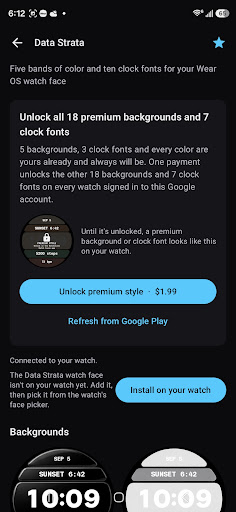
- Tells you, for each face, exactly which styles are included and which a purchase unlocks
- Unlocks a face's premium styles with a single one-time purchase and sends the unlock to your watch, usually within seconds
- Sets up faces that show your own information, such as a shift rota, with a preview before you save
- Tells you what is still missing on your watch - the watch face, or the small Watcholate app that runs beside it - and opens the right Google Play page on the watch for you
- Opens straight to a face's page when you tap Open on phone on your watch
- Restores your purchases on a new phone, a new watch or after a reset
FAIR PRICING
There are no subscriptions and nothing recurring. Every face comes with styles that are yours to keep at no cost, and some faces are completely free. A paid face is a single one-time purchase that covers every watch signed in to the same Google account. You can pick a premium style on your watch before you buy it: it shows as locked, so you always see exactly what you would get.
WHAT YOU NEED
- A Wear OS watch paired with this phone, running Wear OS 5 or later
- The watch face you want, installed on your watch from Google Play
- This app on your phone, plus its small companion app on your watch, which carries unlocks and your settings to the face. This app offers to open its Play page on the watch for you.
PRIVACY
No accounts, no ads and no analytics. Purchases are handled by Google Play, and unlocks and your settings travel straight to your watch over the Wear OS connection. Steps, heart rate, battery and weather are read by Wear OS on the watch itself and never leave it. The app loads face pictures and release notes from watcholate.com, the same way a web browser loads a page. Full policy: https://watcholate.com/privacy
DISCLAIMER
Watch faces that show health readings take them from your watch's own sensors; they are not for medical use. Faces that show market hours or schedules are for reference only - not financial advice, and not a replacement for your official roster.
From Watcholate.
The watch faces themselves are separate downloads that you install on your watch from Google Play. This app is where you see them, unlock them and look after them. New Watcholate faces are added here as they are released.
WHAT THIS APP DOES
- Shows every face and every style side by side, with pictures, before you decide
- Tells you, for each face, exactly which styles are included and which a purchase unlocks
- Unlocks a face's premium styles with a single one-time purchase and sends the unlock to your watch, usually within seconds
- Sets up faces that show your own information, such as a shift rota, with a preview before you save
- Tells you what is still missing on your watch - the watch face, or the small Watcholate app that runs beside it - and opens the right Google Play page on the watch for you
- Opens straight to a face's page when you tap Open on phone on your watch
- Restores your purchases on a new phone, a new watch or after a reset
FAIR PRICING
There are no subscriptions and nothing recurring. Every face comes with styles that are yours to keep at no cost, and some faces are completely free. A paid face is a single one-time purchase that covers every watch signed in to the same Google account. You can pick a premium style on your watch before you buy it: it shows as locked, so you always see exactly what you would get.
WHAT YOU NEED
- A Wear OS watch paired with this phone, running Wear OS 5 or later
- The watch face you want, installed on your watch from Google Play
- This app on your phone, plus its small companion app on your watch, which carries unlocks and your settings to the face. This app offers to open its Play page on the watch for you.
PRIVACY
No accounts, no ads and no analytics. Purchases are handled by Google Play, and unlocks and your settings travel straight to your watch over the Wear OS connection. Steps, heart rate, battery and weather are read by Wear OS on the watch itself and never leave it. The app loads face pictures and release notes from watcholate.com, the same way a web browser loads a page. Full policy: https://watcholate.com/privacy
DISCLAIMER
Watch faces that show health readings take them from your watch's own sensors; they are not for medical use. Faces that show market hours or schedules are for reference only - not financial advice, and not a replacement for your official roster.
From Watcholate.
App Info
Version
Updated on
N/A
Size
Requires Android
Package ID
com.watcholate.companion
Installs
9
Category
Personalization
App Permissions
-
Other
- view network connections
- full network access
- Google Play license check


