

Tancha S41 Analog Watch Face
Personalization
0.0
122 Downloads
"The perfect looks and easy to read Analog watch face."
Installeren via Google Play
Paid App




Over deze app
Tancha 41 Analog Watch Face
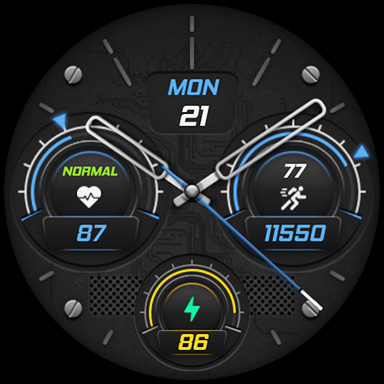
The perfect looks and easy-to-read Analog watch face, by Tancha for Wear OS devices.
This watch face is designed by Tancha Watch Faces for use on Wear OS devices.
FEATURES
Analog watch face
* Day of the week (tap on the logo make it visible).
* Date of the month (tap on the logo make it visible).
* Battery status.
* Steps counter.
* Heart Rate.
* Always on view.
FAQ :
1- The watch face is installed on your watch but does not appear in the catalog?
FOLLOW THESE STEPS:
Press and hold your watch screen.
Swipe right until you see the text 'Add watch face.'
Press the '+ Add watch face' button.
Find and activate the watch face you installed.
2- If the companion app is installed but the watch face is not, follow the steps below:
FOLLOW THESE STEPS:
Open the companion app on your phone (ensure that your smartwatch is connected to your phone).
Next, tap the 'INSTALL WATCH FACE ON WATCH' button at the bottom of the app.
This will open the Play Store on your WEAR OS smartwatch, displaying the purchased watch face and allowing you to install it directly.
If you have any questions or requests, please don't hesitate to get in touch with me at [email protected].
Thank you sincerely for your support.
Best regards,
Tancha Watch Faces
The perfect looks and easy-to-read Analog watch face, by Tancha for Wear OS devices.
This watch face is designed by Tancha Watch Faces for use on Wear OS devices.
FEATURES
Analog watch face
* Day of the week (tap on the logo make it visible).
* Date of the month (tap on the logo make it visible).
* Battery status.
* Steps counter.
* Heart Rate.
* Always on view.
FAQ :
1- The watch face is installed on your watch but does not appear in the catalog?
FOLLOW THESE STEPS:
Press and hold your watch screen.
Swipe right until you see the text 'Add watch face.'
Press the '+ Add watch face' button.
Find and activate the watch face you installed.
2- If the companion app is installed but the watch face is not, follow the steps below:
FOLLOW THESE STEPS:
Open the companion app on your phone (ensure that your smartwatch is connected to your phone).
Next, tap the 'INSTALL WATCH FACE ON WATCH' button at the bottom of the app.
This will open the Play Store on your WEAR OS smartwatch, displaying the purchased watch face and allowing you to install it directly.
If you have any questions or requests, please don't hesitate to get in touch with me at [email protected].
Thank you sincerely for your support.
Best regards,
Tancha Watch Faces
App-info
Versie
Bijgewerkt op
N/A
Grootte
Vereist Android
Pakket-ID
com.watchfacestudio.tanchas41
Installaties
122
Categorie
Personalization
App-machtigingen
-
Other
- view network connections
- pair with Bluetooth devices
- access Bluetooth settings
- full network access

Beoordelingen en recensies
0.0
Totaal aantal beoordelingen
5
4
3
2
1
M
Magdy Said
Apr 07, 2025
جميله وشيك
E
Etienne Willemse
Feb 17, 2025
Such a beautiful looking anologue design. Love the look of it and font used. Rating it 10 stars. Amazing job Tancha . Thank you


