

Caelus Duotone Icon Pack
Personalization
4.6
10K+ Downloads
"Most consistent colorful linear duotone icon pack. Neon style homescreen!"
Installeren via Google Play
Paid App




Over deze app
Caelus Duotone icon pack is a set of custom colorful linear icons with semi-transparent fill (duotone style) for your homescreen and app drawer. It can be applied on almost any custom launcher (Nova launcher, Lawnchair, Niagara, etc.) and some default launchers like the Samsung OneUI launcher (via Theme Park app), OnePlus launcher, Oppo’s Color OS, Nothing launcher, etc.
Why do you need a custom icon pack?
Unified icons make your homescreen and app drawer much prettier, and since we all use our phones a few hours per day, it will significantly improve your experience.
What do you get from Caelus Duotone?
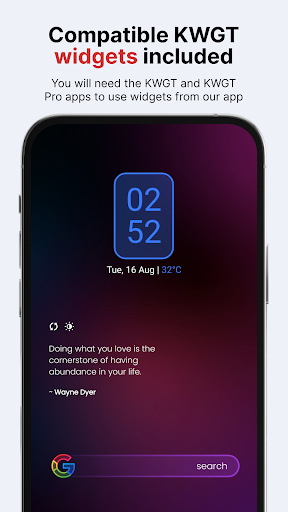
Caelus Duotone icon pack has 4,363 icons, 20 custom wallpapers, and 6 KWGT widgets, so it’s all you need to personalize your phone how you like it. For the price of one app, you get content from three different apps. Caelus Duotone icons are linear with semi-transparent details, and the color palette is vibrant, so it goes well with dark wallpapers. Caelus Duotone icon pack is made on a 24x24 px grid with 1 px line thickness, with special attention to size for every icon, so you don't have to worry about the size or line thickness consistency. *To apply KWGT widgets, you need KWGT and KWGT Pro apps.
What if I don’t like the icons after I buy them, or there are a lot of missing icons for the apps I have installed on my phone?
Don’t worry; we offer a 100% refund for the first 24h from when you purchase our pack. No questions asked! But, if you are willing to wait a bit, we update our app every two weeks, so there will be many more apps covered in the future, possibly the ones currently missing too. And if you don’t want to wait and you like our pack, we also offer Premium icon requests which are added in the next release from the moment you send it to us.
Some more Caelus Duotone features
Resolution of icons: 256 x 256 px
Best for dark wallpapers and themes (20 included in the app)
Alternate icons for a lot of popular apps
Dynamic calendar icon
Masking of unthemed icons
Folders icons (apply them manually)
Miscellaneous icons (apply them manually)
Tap to send icon requests (Free and Premium)
How to send an icon request for the Caelus Duotone icon pack?
Open our app and click on the Request card. Check all icons you want to be themed and send requests by pressing the Floating Send button. You will get a share screen with options on how to share requests, and you need to choose Gmail (some other mail clients like Spark, etc., have problems attaching the zip file, which is the most important part of the email). When sending an email, DO NOT delete generated zip file or change the Subject and text in the body of the email – if you do that, your request will become unusable!
Supported Launchers
Action Launcher • ADW Launcher • ADW ex Launcher • Apex Launcher • Go Launcher • Google Now Launcher • Holo Launcher • Holo ICS Launcher • Lawnchair • LG Home Launcher • LineageOS Launcher • Lucid Launcher • Nova Launcher • Niagara Launcher • Pixel Launcher • Posidon Launcher • Smart Launcher • Smart pro Launcher • Solo Launcher • Square Home Launcher • TSF Launcher.
Other launchers can apply Caelus Duotone linear icons from your launcher settings.
More info about properly using icon packs will be available soon on our new website.
Having more questions?
Don’t hesitate to write us an email/message if you have a special request or any suggestions or questions.
Email: [email protected]
Twitter: www.twitter.com/One4Studio
Telegram channel: https://t.me/one4studio
Developer page: https://play.google.com/store/apps/dev?id=7550572979310204381
Why do you need a custom icon pack?
Unified icons make your homescreen and app drawer much prettier, and since we all use our phones a few hours per day, it will significantly improve your experience.
What do you get from Caelus Duotone?
Caelus Duotone icon pack has 4,363 icons, 20 custom wallpapers, and 6 KWGT widgets, so it’s all you need to personalize your phone how you like it. For the price of one app, you get content from three different apps. Caelus Duotone icons are linear with semi-transparent details, and the color palette is vibrant, so it goes well with dark wallpapers. Caelus Duotone icon pack is made on a 24x24 px grid with 1 px line thickness, with special attention to size for every icon, so you don't have to worry about the size or line thickness consistency. *To apply KWGT widgets, you need KWGT and KWGT Pro apps.
What if I don’t like the icons after I buy them, or there are a lot of missing icons for the apps I have installed on my phone?
Don’t worry; we offer a 100% refund for the first 24h from when you purchase our pack. No questions asked! But, if you are willing to wait a bit, we update our app every two weeks, so there will be many more apps covered in the future, possibly the ones currently missing too. And if you don’t want to wait and you like our pack, we also offer Premium icon requests which are added in the next release from the moment you send it to us.
Some more Caelus Duotone features
Resolution of icons: 256 x 256 px
Best for dark wallpapers and themes (20 included in the app)
Alternate icons for a lot of popular apps
Dynamic calendar icon
Masking of unthemed icons
Folders icons (apply them manually)
Miscellaneous icons (apply them manually)
Tap to send icon requests (Free and Premium)
How to send an icon request for the Caelus Duotone icon pack?
Open our app and click on the Request card. Check all icons you want to be themed and send requests by pressing the Floating Send button. You will get a share screen with options on how to share requests, and you need to choose Gmail (some other mail clients like Spark, etc., have problems attaching the zip file, which is the most important part of the email). When sending an email, DO NOT delete generated zip file or change the Subject and text in the body of the email – if you do that, your request will become unusable!
Supported Launchers
Action Launcher • ADW Launcher • ADW ex Launcher • Apex Launcher • Go Launcher • Google Now Launcher • Holo Launcher • Holo ICS Launcher • Lawnchair • LG Home Launcher • LineageOS Launcher • Lucid Launcher • Nova Launcher • Niagara Launcher • Pixel Launcher • Posidon Launcher • Smart Launcher • Smart pro Launcher • Solo Launcher • Square Home Launcher • TSF Launcher.
Other launchers can apply Caelus Duotone linear icons from your launcher settings.
More info about properly using icon packs will be available soon on our new website.
Having more questions?
Don’t hesitate to write us an email/message if you have a special request or any suggestions or questions.
Email: [email protected]
Twitter: www.twitter.com/One4Studio
Telegram channel: https://t.me/one4studio
Developer page: https://play.google.com/store/apps/dev?id=7550572979310204381
App-info
Versie
5.4.1
Bijgewerkt op
Sep 03, 2026
Grootte
Vereist Android
8.0
Pakket-ID
one4studio.iconpack.caelusduotone
Installaties
10K+
Categorie
Personalization
Wat is nieuw
Sep 3, 2026 - v5.4.1
5 new icons
Aug 28, 2026 - v5.4.0
32 new icons
Aug 3, 2026 - v5.3.9
5 new icons
Jul 31, 2026 - v5.3.8
4 new · 1 updated icons
Jul 27, 2026 - v5.3.7
40 new icons
Jul 16, 2026 - v5.3.6
Fixed icons missing after the previous update
Jul 16, 2026 - v5.3.5
5 new icons
Jun 26, 2026 - v5.3.4
5 new icons
5 new icons
Aug 28, 2026 - v5.4.0
32 new icons
Aug 3, 2026 - v5.3.9
5 new icons
Jul 31, 2026 - v5.3.8
4 new · 1 updated icons
Jul 27, 2026 - v5.3.7
40 new icons
Jul 16, 2026 - v5.3.6
Fixed icons missing after the previous update
Jul 16, 2026 - v5.3.5
5 new icons
Jun 26, 2026 - v5.3.4
5 new icons
App-machtigingen
-
Location
- approximate location (network-based)
-
Other
- view network connections
- full network access
- run at startup
- set wallpaper
- prevent device from sleeping
- read Google service configuration


Beoordelingen en recensies
4.6
Totaal aantal beoordelingen
5
4
3
2
1
B
Bro
Aug 17, 2026
Beautifull icons 👍
D
Danny Ying
Jul 22, 2026
love the icons. new icons added frequently
E
Eliot Watts
Jun 02, 2026
Absolutely gorgeous! 🤩
V
Varadaraj Nayak
Aug 01, 2025
Doesn't work properly with nothing launcher
A
Arslan Shadab
Jun 09, 2025
I requested icons a year before and still no update of those apps icons. please update them.
A
ALi RAo
May 08, 2025
Not a single request included. 😒


