

CompliFy - Watch Face Data
Personalization




O tej aplikacji
⭐ Compatible with all Wear OS watches including the new Samsung Galaxy Watch 4 Series! ⭐
❗ IMPORTANT ❗ - Not compatible with Samsung Watches that use Tizen or other smartwatches with other operating systems than Wear OS.
💡IMPORTANT - Please note: As a data provider, all we can do is provide your watch face with data - it is then up to the watch face to decide how it will display this information.
★Features★
✔ Digital Clock
✔ Current Date
✔ Watch Battery
✔ Phone Battery (Must be connected to Android Device)
✔ Current Weather (Must be connected to Android Device)
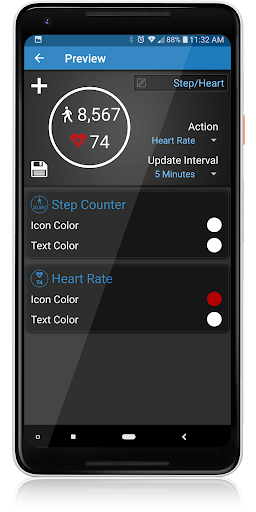
✔ Step Counter
✔ Heart Rate
✔ Custom layout editor (Can include up to 2 data points)
• Long press to drag and re-order (Phone app)
• Swipe to remove (Phone app)
✔ Interactive Actions (Action or Tap)
★How to install★
• If you have Wear OS, you will need to install the app directly from the Play Store on your watch.
• To take advantage of all of the features, you will need to also install the App on your Android phone from the Play store.
★How to use★
• To use a Complify Data point, you will need to select a Third Party complication on your watch face. (Implementation of this this may vary depending on your watch face.)
• Select CompliFy from the list of available providers.
• Select between Custom, Long, Range & Short.
• Select the data point you would like to display on your watch.
• To edit the data information or create your custom layout, open the settings app on either your watch or phone.
If you have any problems at all, please send us an email before leaving a negative review - We will do our best to fix the issue as soon as possible.
★Trouble Shooting★
http://deniteappz.com/complify/troubleshooting.html
Stay tuned for more to come!
Informacje o aplikacji
Uprawnienia aplikacji
-
Location
- approximate location (network-based)
- precise location (GPS and network-based)
-
Photos/Media/Files
- read the contents of your USB storage
- modify or delete the contents of your USB storage
-
Storage
- read the contents of your USB storage
- modify or delete the contents of your USB storage
-
Wearable sensors/Activity data
- body sensors (like heart rate monitors)
-
Other
- view network connections
- full network access
- run at startup
- set wallpaper
- control vibration
- prevent device from sleeping
- Google Play license check


Oceny i opinie
Seems to work OK for the most part, but it seems like some of the features are redundant and clash with the apps already on the watch. Still, the watch/battery indicator combined is pretty hard to beat.
Not Wear OS 3 compatible. :( Furthermore on WearOS2 you're charged for both the companion app and the watch app.
For custom should be able to pick clock. Also should be able to pick short or long.
I got this so I could have my heart rate on my watch face. It works, but even though I have vibrate unchecked, it still vibrates every time my heart rate changes.
Nice idea but does not sync custom complications to the watch from phone. Just shows “no data” when selecting Custom on the watch, even if it was created on the watch. Fix this and it may be worth paying for. Seems untested alpha stuff.


