

Midnight Club Icon Pack
Personalization
4.0
4.4K+ Pobrania
"Enjoy The True Neon Experience with this Icon Pack"
Zainstaluj w Google Play
Paid App




O tej aplikacji
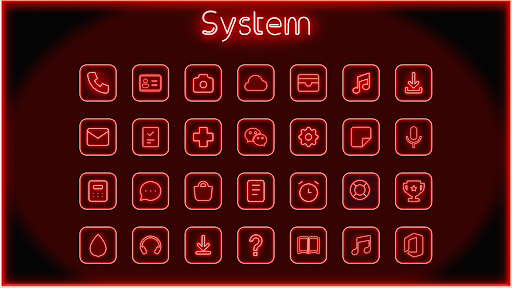
This is Truly the Best Neon Icon Pack in the Play Store. Enjoy The True Neon Experience with the Midnight Club Icon Pack. The Neon Effect is created with a 5 Layer system which looks incredible and insane on your Android Phone. Each icon is designed very carefully to create a perfect and pure Neon Effect,
leaving you just to groove with it.
This might be the best Neon Icon pack available on the Play Store with beautiful icons and custom wallpapers.
In Todays Modern Era, Our Mobiles are changing our Lifestyle so why not give it a makeover and stand out from the crowd. Get it Now!
Features :
• 1000+ Icons and growing...
• New Icons added each week
• Auto Icon Masking for unthemed App Icons
• Material Dashboard
• Beautiful Wallpapers
• Custom folder icons
• Category-based Icons
• Custom app drawer icons
• Unlimited Icon Request
Support
If you have any issue with using Icon pack. Just email me at [email protected]
How to use this Icon pack?
Step 1 : Install supported theme Launcher
Step 2 : Open Midnight Club Icon Pack and Go to Apply section and Select Launcher to apply.
If your launcher is not in a list make sure you apply it from your launcher settings
DISCLAIMER
• A supported launcher is required to use this icon pack!
Icon Pack Supported Launchers
Action Launcher • ADW Launcher • Apex Launcher •Atom Launcher • Aviate Launcher • CM Theme Engine • GO Launcher • Holo Launcher • Holo Launcher HD • LG Home • Lucid Launcher • M Launcher • Mini Launcher • Next Launcher • Nougat Launcher •Nova Launcher(recommended) • Smart Launcher •Solo Launcher •V Launcher • ZenUI Launcher •Zero Launcher • ABC Launcher •Evie Launcher • L Launcher • Lawnchair
Icon Pack Supported Launchers not Included in Apply Section
Arrow Launcher • ASAP Launcher •Cobo Launcher •Line Launcher •Mesh Launcher •Peek Launcher • Z Launcher • Launch by Quixey Launcher • iTop Launcher • KK Launcher • MN Launcher • New Launcher • S Launcher • Open Launcher • Flick Launcher • Poco Launcher
This icon pack has been tested, and it works with these launchers. However, it may also work with others too.In case you do not found an apply section in dashboard. You can apply icon pack from a theme setting.
Extra Notes
• Icon pack needs a launcher in order to work.
• Google Now Launcher do not support any icon packs.
• Missing an Icon? feel free to send me an icon request and I will try to update this pack with your requests.
Contact Me
Email : [email protected]
CREDITS
• Jahir Fiquitiva for providing such a great dashboard.
leaving you just to groove with it.
This might be the best Neon Icon pack available on the Play Store with beautiful icons and custom wallpapers.
In Todays Modern Era, Our Mobiles are changing our Lifestyle so why not give it a makeover and stand out from the crowd. Get it Now!
Features :
• 1000+ Icons and growing...
• New Icons added each week
• Auto Icon Masking for unthemed App Icons
• Material Dashboard
• Beautiful Wallpapers
• Custom folder icons
• Category-based Icons
• Custom app drawer icons
• Unlimited Icon Request
Support
If you have any issue with using Icon pack. Just email me at [email protected]
How to use this Icon pack?
Step 1 : Install supported theme Launcher
Step 2 : Open Midnight Club Icon Pack and Go to Apply section and Select Launcher to apply.
If your launcher is not in a list make sure you apply it from your launcher settings
DISCLAIMER
• A supported launcher is required to use this icon pack!
Icon Pack Supported Launchers
Action Launcher • ADW Launcher • Apex Launcher •Atom Launcher • Aviate Launcher • CM Theme Engine • GO Launcher • Holo Launcher • Holo Launcher HD • LG Home • Lucid Launcher • M Launcher • Mini Launcher • Next Launcher • Nougat Launcher •Nova Launcher(recommended) • Smart Launcher •Solo Launcher •V Launcher • ZenUI Launcher •Zero Launcher • ABC Launcher •Evie Launcher • L Launcher • Lawnchair
Icon Pack Supported Launchers not Included in Apply Section
Arrow Launcher • ASAP Launcher •Cobo Launcher •Line Launcher •Mesh Launcher •Peek Launcher • Z Launcher • Launch by Quixey Launcher • iTop Launcher • KK Launcher • MN Launcher • New Launcher • S Launcher • Open Launcher • Flick Launcher • Poco Launcher
This icon pack has been tested, and it works with these launchers. However, it may also work with others too.In case you do not found an apply section in dashboard. You can apply icon pack from a theme setting.
Extra Notes
• Icon pack needs a launcher in order to work.
• Google Now Launcher do not support any icon packs.
• Missing an Icon? feel free to send me an icon request and I will try to update this pack with your requests.
Contact Me
Email : [email protected]
CREDITS
• Jahir Fiquitiva for providing such a great dashboard.
Informacje o aplikacji
Wersja
1.0.1
Zaktualizowano w dniu
Nov 24, 2022
Rozmiar
Wymaga Androida
5.0
ID pakietu
com.nodeshaper.midnightclub
Instalacje
4.4K+
Kategoria
Personalization
Co nowego
Tweaked Dashboard
Uprawnienia aplikacji
-
Photos/Media/Files
- read the contents of your USB storage
- modify or delete the contents of your USB storage
-
Storage
- read the contents of your USB storage
- modify or delete the contents of your USB storage
-
Wi-Fi connection information
- view Wi-Fi connections
-
Other
- adjust your wallpaper size
- view network connections
- full network access
- run at startup
- set wallpaper
- control vibration
- prevent device from sleeping
- modify system settings
- Google Play license check


Oceny i opinie
4.0
Ogólne oceny
5
4
3
2
1
H
Harshil Agarwal
Mar 26, 2025
it's faie
S
Shuaibu Usman Ahmed
Aug 05, 2024
Just Beautiful
C
Colin Simone
Feb 21, 2024
I absolutely love this pack! It would be even more AMAZING in a multi color version or different single color variants. I know I can't be the only one who thinks this.
M
Muzammil
Jan 18, 2024
Really nice icon pack worth buying. Thanks dev
R
Raviraj MN
Dec 05, 2023
Beautiful icon pack
E
Espen Laub
Dec 05, 2023
🧡👍


