CELEST5475 Retro Digital Watch
Personalization
0.0
635 Pobrania
"Retro LCD watch face with analog dial, steps, heart rate, battery & seconds."
Zainstaluj w Google Play
Paid App


O tej aplikacji
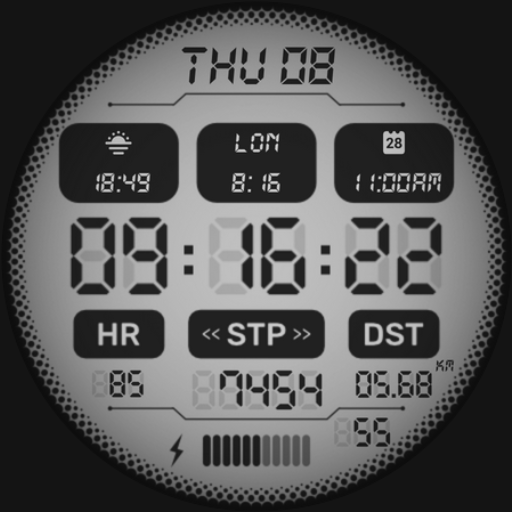
Retro digital, laid out like a proper LCD module: CELEST5475 Retro Digital Watch fills the whole face with one screen and packs it the way eighties watches did — small labels, segment numerals, everything in its own compartment.
A miniature analog dial sits top left, showing the same time in hands alongside the digits, with the month and day beside it. Steps, heart rate, and battery percentage stack in labeled rows underneath. Two arcs curve up the sides of the screen: battery level on one, the seconds ticking through their last digit on the other. The main time runs large across the middle with AM/PM, and a strip of weekday abbreviations along the bottom marks the current day. Ten LCD background colors set the panel, the content switches between black and white, and the border comes ten ways including plain black, eight camo patterns, and invisible if you want the screen edge to edge.
📟 Features
- Full-screen retro LCD layout with segment numerals
- Analog and digital time together on one dial
- Month and day display
- Steps, heart rate, and battery percentage
- Battery arc and animated seconds arc
- Weekday indicator strip along the bottom
🎨 Customization
- 10 LCD background colors
- Black or white LCD content
- 10 border variations: invisible, black, and 8 camo patterns
- 5 branding variations: invisible plus 4 colors
✅ Compatible Devices
- Google Pixel Watch/2/3/4/5
- OnePlus Watch 2/2R/3/4
- Oppo Watch X2/X3
- Samsung Galaxy Watch 4/4 Classic/5/5 Pro/6/6 Classic/7/8/8 Classic/9/FE/Ultra (2024)/(2025)/Ultra 2
- Xiaomi Watch 2/2 Pro/5
🎁 BOGO Promotion: https://celest-watches.com/bogo/
✨ Explore the complete CELEST collection in one place — including all Wear OS, HUAWEI, and Apple Watch faces, along with our apps and tools — with the CELEST Catalog app: https://play.google.com/store/apps/details?id=com.celestwatches.catalog
🔧 Installation Help
Having trouble? We've got you covered:
- Use the dropdown menu next to "Install" on your phone to select your watch model or install directly from your watch's Play Store app.
- Updating weather data (if the watch face shows weather) may take time after installation but switching to another watch face and switching back or restarting both the watch and phone usually helps.
- Check out our installation and troubleshooting guide: https://celest-watches.com/installation-troubleshooting/
- Contact us at [email protected] for quick support
📞 Support & Community
📧 Support: [email protected]
📱 Follow @celestwatches on Instagram and subscribe to our newsletter to get notified of new releases and deals: https://celest-watches.com/newsletter/
A miniature analog dial sits top left, showing the same time in hands alongside the digits, with the month and day beside it. Steps, heart rate, and battery percentage stack in labeled rows underneath. Two arcs curve up the sides of the screen: battery level on one, the seconds ticking through their last digit on the other. The main time runs large across the middle with AM/PM, and a strip of weekday abbreviations along the bottom marks the current day. Ten LCD background colors set the panel, the content switches between black and white, and the border comes ten ways including plain black, eight camo patterns, and invisible if you want the screen edge to edge.
📟 Features
- Full-screen retro LCD layout with segment numerals
- Analog and digital time together on one dial
- Month and day display
- Steps, heart rate, and battery percentage
- Battery arc and animated seconds arc
- Weekday indicator strip along the bottom
🎨 Customization
- 10 LCD background colors
- Black or white LCD content
- 10 border variations: invisible, black, and 8 camo patterns
- 5 branding variations: invisible plus 4 colors
✅ Compatible Devices
- Google Pixel Watch/2/3/4/5
- OnePlus Watch 2/2R/3/4
- Oppo Watch X2/X3
- Samsung Galaxy Watch 4/4 Classic/5/5 Pro/6/6 Classic/7/8/8 Classic/9/FE/Ultra (2024)/(2025)/Ultra 2
- Xiaomi Watch 2/2 Pro/5
🎁 BOGO Promotion: https://celest-watches.com/bogo/
✨ Explore the complete CELEST collection in one place — including all Wear OS, HUAWEI, and Apple Watch faces, along with our apps and tools — with the CELEST Catalog app: https://play.google.com/store/apps/details?id=com.celestwatches.catalog
🔧 Installation Help
Having trouble? We've got you covered:
- Use the dropdown menu next to "Install" on your phone to select your watch model or install directly from your watch's Play Store app.
- Updating weather data (if the watch face shows weather) may take time after installation but switching to another watch face and switching back or restarting both the watch and phone usually helps.
- Check out our installation and troubleshooting guide: https://celest-watches.com/installation-troubleshooting/
- Contact us at [email protected] for quick support
📞 Support & Community
📧 Support: [email protected]
📱 Follow @celestwatches on Instagram and subscribe to our newsletter to get notified of new releases and deals: https://celest-watches.com/newsletter/
Informacje o aplikacji
Wersja
Zaktualizowano w dniu
Aug 05, 2026
Rozmiar
Wymaga Androida
ID pakietu
com.watchfacestudio.celest5475
Instalacje
635
Kategoria
Personalization
Co nowego
Updated to target Android 16 (API 36).
Uprawnienia aplikacji
-
Other
- view network connections
- full network access

Oceny i opinie
0.0
Ogólne oceny
5
4
3
2
1
P
Patrick Tan
Jul 14, 2024
Too many shadows reflections. Not sharp and clear
B
Brendon Hall
Oct 23, 2023
The 4 best digital watchfaces ever made are from CELEST. This is one of the four. Great work