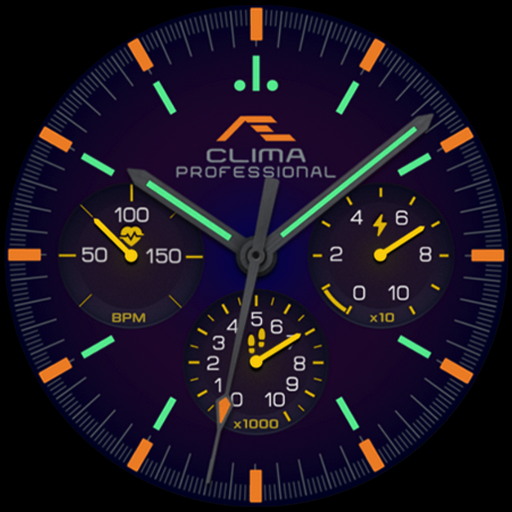
CELEST1730 Analog Watch
Personalization
0.0
575 Pobrania
"Analog watch face with gyro gradient, weekday, date & 24-hour sub-dials."
Zainstaluj w Google Play
Paid App


O tej aplikacji
Analog with a dial that catches the light: CELEST1730 Analog Watch uses a gyro-driven gradient, so the sheen across the face shifts as you turn your wrist rather than sitting flat the way a printed background would.
Three sub-dials sit inside the hours — weekday on the left, date on the right, 24-hour time at six o'clock, each with its own slim hand. Applied lume markers ring the dial with an accent numeral at twelve, and the seconds hand runs in the same accent color. Nine color variations set the whole thing, gradient included.
⌚ Features
- Gyro-driven gradient background that shifts as you move
- Weekday sub-dial
- Date sub-dial
- 24-hour sub-dial
- Applied lume markers with an accent numeral at twelve
🎨 Customization
- 9 color variations
✅ Compatible Devices
- Google Pixel Watch/2/3/4/5
- OnePlus Watch 2/2R/3/4
- Oppo Watch X2/X3
- Samsung Galaxy Watch 4/4 Classic/5/5 Pro/6/6 Classic/7/8/8 Classic/9/FE/Ultra (2024)/(2025)/Ultra 2
- Xiaomi Watch 2/2 Pro/5
🎁 BOGO Promotion: https://celest-watches.com/bogo/
✨ Explore the complete CELEST collection in one place — including all Wear OS, HUAWEI, and Apple Watch faces, along with our apps and tools — with the CELEST Catalog app: https://play.google.com/store/apps/details?id=com.celestwatches.catalog
🔧 Installation Help
Having trouble? We've got you covered:
- Use the dropdown menu next to "Install" on your phone to select your watch model or install directly from your watch's Play Store app.
- Updating weather data (if the watch face shows weather) may take time after installation but switching to another watch face and switching back or restarting both the watch and phone usually helps.
- Check out our installation and troubleshooting guide: https://celest-watches.com/installation-troubleshooting/
- Contact us at [email protected] for quick support
📞 Support & Community
📧 Support: [email protected]
📱 Follow @celestwatches on Instagram and subscribe to our newsletter to get notified of new releases and deals: https://celest-watches.com/newsletter/
Three sub-dials sit inside the hours — weekday on the left, date on the right, 24-hour time at six o'clock, each with its own slim hand. Applied lume markers ring the dial with an accent numeral at twelve, and the seconds hand runs in the same accent color. Nine color variations set the whole thing, gradient included.
⌚ Features
- Gyro-driven gradient background that shifts as you move
- Weekday sub-dial
- Date sub-dial
- 24-hour sub-dial
- Applied lume markers with an accent numeral at twelve
🎨 Customization
- 9 color variations
✅ Compatible Devices
- Google Pixel Watch/2/3/4/5
- OnePlus Watch 2/2R/3/4
- Oppo Watch X2/X3
- Samsung Galaxy Watch 4/4 Classic/5/5 Pro/6/6 Classic/7/8/8 Classic/9/FE/Ultra (2024)/(2025)/Ultra 2
- Xiaomi Watch 2/2 Pro/5
🎁 BOGO Promotion: https://celest-watches.com/bogo/
✨ Explore the complete CELEST collection in one place — including all Wear OS, HUAWEI, and Apple Watch faces, along with our apps and tools — with the CELEST Catalog app: https://play.google.com/store/apps/details?id=com.celestwatches.catalog
🔧 Installation Help
Having trouble? We've got you covered:
- Use the dropdown menu next to "Install" on your phone to select your watch model or install directly from your watch's Play Store app.
- Updating weather data (if the watch face shows weather) may take time after installation but switching to another watch face and switching back or restarting both the watch and phone usually helps.
- Check out our installation and troubleshooting guide: https://celest-watches.com/installation-troubleshooting/
- Contact us at [email protected] for quick support
📞 Support & Community
📧 Support: [email protected]
📱 Follow @celestwatches on Instagram and subscribe to our newsletter to get notified of new releases and deals: https://celest-watches.com/newsletter/
Informacje o aplikacji
Wersja
Zaktualizowano w dniu
Aug 05, 2026
Rozmiar
Wymaga Androida
ID pakietu
com.watchfacestudio.celest_ad1730
Instalacje
575
Kategoria
Personalization
Co nowego
Updated to target Android 16 (API 36).
Uprawnienia aplikacji
-
Other
- view network connections
- full network access

Oceny i opinie
0.0
Ogólne oceny
5
4
3
2
1
J
Jesse Hurford
Oct 03, 2024
When the companion app loads the face there is only an option to refund the purchase, I can't find a way to install the face, only ask for a refund.
B
Brendon Hall
Aug 19, 2022
Very nice. Love to see the classic designs. Sometimes simple is better. Love the direction your work.is going.