

The Misthios Watch Face
Personalization




O tej aplikacji
✰ Features:
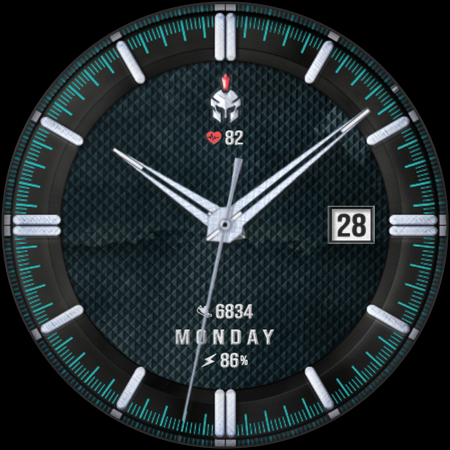
- Analog dial for time
- Heart rate, steps, day of the week and battery information
- Customization (dial background, frame, hour marker and dial hands colors)
- 4 preset app shortcut (heart rate, battery, steps and calendar/events)
- 8 custom shortcuts to access your favorite widget
- Always on display now synced to your active colour theme and can be dimmed down to save more battery (brightness options)
INSTALLATION:
1. Make sure your watch is connected to your smartphone (Bluetooth) with same GOOGLE account.
2. In Play Store App, select your watch as targeted device for installation. The watch face will be installed on your watch.
3. After installation, if your active watch face is not replaced. Follow these 3 SIMPLE STEPS before you comment not working.
3.1- Long press on your current watch face --> swipe to right until --> "Add watch face" (+/plus sign)
3.2- Scroll down and look for "Downloaded" section
3.3- Search and click on your new watch face to activate it - and that's it!
SETTING UP SHORTCUTS/BUTTONS:
1. Press and hold the watch display.
2. Tap customize button.
3. Swipe from right to left until you reach the "complications".
4. The 8 shortcuts are highlighted. Click on it to set what you want.
CUSTOMIZATION OF DIAL STYLE e.g. BACKGROUND, INDEX ETC:
1. Press and hold display then hit "Customize".
2. Swipe left and right to choose what to customize.
E.g. Background, Index frame etc.
3. Swipe up and down to choose options available.
For bugs, comments or suggestions, don't hesitate to contact me at ([email protected]). If you like this watch face hope you wouldn't mind leaving a review. Thanks for your support!
Informacje o aplikacji
Co nowego
- Updated companion app
- Fixed companion app issue related to DEX code optimization
Uprawnienia aplikacji
-
Other
- Google Play license check

Oceny i opinie
great thanks
can't figure out how to get the face i paid for on my watch. lol
I paid for the watch face 3 times and still won't go to my watch,do not waste your money you won't be able to install the watch face anyway.
Getting this face to even install was a struggle. Once installed I found it impossible to customize the face as advertised. It kept freezing my wearable app on my phone as well as my watch. On the plus side the visual design is extremely good. I wanted this to be good. I liked it so much. I probably would have kept it as my permanent watch face. Refunded and uninstalled.
Paid, doesn't install, asks for payment. That's a fail.
HELPED ME MENTALLY.


