

Data Pilot: Cockpit
Personalization
0.0
0 Downloads
"Cockpit chronometer face: 4 colour gauges, fluid seconds, AOD, 3 themes, more."
Instalar no Google Play
App pago




Sobre este app
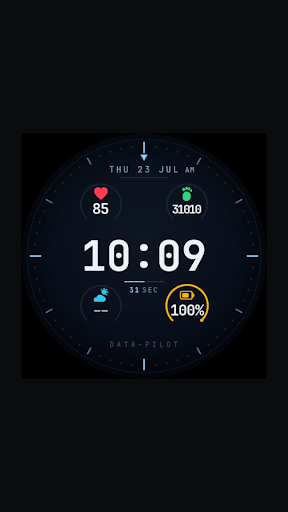
A flight cockpit on your wrist: Data Pilot is a premium chronometer watch face that reimagines the legibility of aircraft and racing instrument panels for modern AMOLED displays. Every digit is sharp, every gauge purposeful — a cockpit language that serves information, not decoration, and reads at a glance.
FOUR COLOUR-CODED GAUGES
Data Pilot's identity is the set of colour-coded arc gauges seated in the four corners of the face:
• Heart rate — red arc, your live pulse
• Steps — green arc, your daily step counter
• Weather — cyan arc, the temperature where you are
• Battery — amber arc, your charge level
Each arc fills along a 270° track with its value; the colours are fixed in the instrument language, so you know which gauge you are reading before you read the number.
FLUID SECONDS CHRONOMETER
Below the centre time sits a seconds bar and counter that sweeps at frame rate — not a stiff tick, but continuous motion like a real chronometer. This fluidity is the signature touch; if you prefer, one tap switches it off for a battery-friendly mode that steps once per second.
THREE COCKPIT THEMES
The same instrument layout, in three characters:
• Amber Cockpit — the warmth of a classic flight panel, amber accents
• Night Ops — a green cockpit that is easy on the eyes in low light
• Rescue — high-visibility red, a search-and-rescue aesthetic
The theme changes the bezel identity (cardinal ticks and direction triangle) and the background; the gauges keep their colour code.
MAKE IT YOURS — DEEP CUSTOMIZATION
Data Pilot is tuned in detail from your watch's face editor:
• Animations — turn the fluid seconds and arc transitions on or off
• Clock format — System, 12-hour or 24-hour
• Show heart rate / Show steps / Show weather — hide any data field you don't want; the layout stays intact, reading as an empty instrument
• Accent colour — five colours for the seconds chronometer: orange, green, cyan, white, purple
• Theme — Amber Cockpit, Night Ops, Rescue
The settings are independent: pair Night Ops with a purple seconds hand, or 24-hour format with a hidden weather field.
ALWAYS-ON DISPLAY (AOD)
In Always-On Display mode, the face switches to a simplified, low-power cockpit: a thin ExtraLight clock, hairline gauge rings and dimmed values. The time stays readable at all times, the AMOLED-optimized black background protects your battery, and animations never enter AOD.
DESIGN PRINCIPLES
• Sharp, engineered typography drawn with JetBrains Mono (open-source OFL)
• A colour code derived from real instrument panels
• Depth from a baked background gradient and vignette; crisp edges at every value thanks to native arcs
• Date, seconds and wordmark in a cockpit layout
COMPATIBILITY
Compatible with smartwatches running Wear OS 5 and above; works smoothly on current Wear OS devices, including Galaxy Watch.
If you are looking for a cockpit-feel, data-driven watch face, put Data Pilot on and watch the gauges fill.
Info do App
Versão
1.1.0
Atualizado em
Jul 28, 2026
Tamanho
Requer Android
ID do pacote
com.orvixa.watchface.datapilot
Instalações
0
Categoria
Personalization
O que há de novo
Version 1.1
- AM/PM: it used to blend into the date row, and in always-on display it was missing entirely. It now has its own indicator between the top instrument wells, and it is drawn in always-on display too. Hidden in 24-hour mode.
- Settings: clearer titles and option names - Smooth motion, Heart rate (top left), Steps (top right) - and every complication slot is named by its position.
- Small visual fixes.
Apps semelhantes

PELAGIC 2.0 — Tide & Marine
maik.ing
0.0

Night ver 20 - watch face
Nighty.Watch.Faces
0.0

Lanturne Beacon: Senior Face
Technium Foundry
0.0

FitSpectrum
Unlimited Dreams Eleven
0.0

Colorful Vibrant For Wear OS
ZKin
0.0

Night Core 13 Watch Face
Nighty Watch Faces
0.0
Mais do desenvolvedor

Mindoi - Brain Games
Orvixa Bilişim Teknoloji Tic. Ltd. Şti.
0.0

Rezerve: Appointment Calendar
Orvixa Bilişim Teknoloji Tic. Ltd. Şti.
0.0

Orbit: Comet Watch Face
Orvixa Bilişim Teknoloji Tic. Ltd. Şti.
0.0

Mürekkep: Fırça Kadran
Orvixa Bilişim Teknoloji Tic. Ltd. Şti.
0.0

Shadow — Stone
Orvixa Bilişim Teknoloji Tic. Ltd. Şti.
0.0

Kum — Hourglass Day
Orvixa Bilişim Teknoloji Tic. Ltd. Şti.
0.0