

JW170 jwstudio
Personalization
0.0
359 Downloads
"High-quality watchfaces for Wear OS 5.0 of higher"
Instalar no Google Play
App pago




Sobre este app
This watch face supports all Wear OS devices with API level 30 or higher, such as Samsung Galaxy Watch 4, 5, 6, 7, 8, Pixel Watch, etc.
+++++++++++++++++++++++++++++++++++++++++++++++
[How to install]
Before pressing the payment button, make sure your watch is selected.
Select your watch by pressing the small triangle next to the payment button.
Select the menu at the top right of the Play Store app (three dots) > Share > Chrome browser > Install on other devices > Clock and proceed.
After installation, select it from the download list, register it as a favorite, and use it. You can view the download list by clicking 'Add Watch Screen' on the far right of the favorites list that appears when you press the watch screen.
+++++++++++++++++++++++++++++++++++++++++++++++
[function]
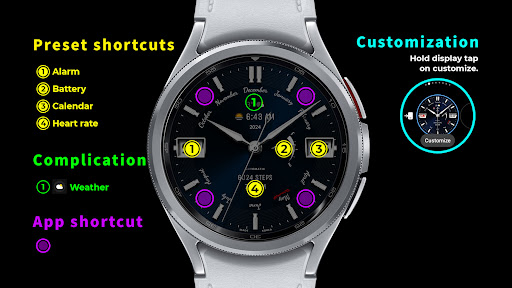
- 4 preset app shortcut
- 4 customizable shortcut keys
- 2 customizable fields/information display
- Changeable background color, hands, index
+++++++++++++++++++++++++++++++++++++++++++++++
[Custom]
1 - Touch and hold the display.
2 - Tap on Custom Options
For inquiries, please contact the email below.
[email protected]
+++++++++++++++++++++++++++++++++++++++++++++++
[How to install]
Before pressing the payment button, make sure your watch is selected.
Select your watch by pressing the small triangle next to the payment button.
Select the menu at the top right of the Play Store app (three dots) > Share > Chrome browser > Install on other devices > Clock and proceed.
After installation, select it from the download list, register it as a favorite, and use it. You can view the download list by clicking 'Add Watch Screen' on the far right of the favorites list that appears when you press the watch screen.
+++++++++++++++++++++++++++++++++++++++++++++++
[function]
- 4 preset app shortcut
- 4 customizable shortcut keys
- 2 customizable fields/information display
- Changeable background color, hands, index
+++++++++++++++++++++++++++++++++++++++++++++++
[Custom]
1 - Touch and hold the display.
2 - Tap on Custom Options
For inquiries, please contact the email below.
[email protected]
Info do App
Versão
Atualizado em
Sep 18, 2025
Tamanho
Requer Android
ID do pacote
com.watchfacestudio.jwstudio_a_170
Instalações
359
Categoria
Personalization
O que há de novo
v1.4 update
- Support Android Target SDK 33 (Wear OS 5)
- Support Companion app Target API level 35
- Support Android Target SDK 33 (Wear OS 5)
- Support Companion app Target API level 35
Permissões do aplicativo
-
Wearable sensors/Activity data
- body sensors (like heart rate monitors)
-
Other
- reorder running apps
- control vibration
- prevent device from sleeping
- set an alarm


Avaliações e resenhas
0.0
Total de avaliações
5
4
3
2
1
J
Jignesh Jain
Mar 08, 2026
beautifully designed classic day date
M
Miliano Vercelli
Aug 14, 2024
Fantastic art work. The latest update has made this a beautifully styled and well rounded watch face that perfectly compliments the Galaxy Watch 6 classic's design. Also like to compliment the developer, it is great to see developers listening to user feedback implementing ideas. To complete the design, it would be great to see the AOD luminance effect on the white inserts on the hour and minute hands as well. Keep up the great work.


